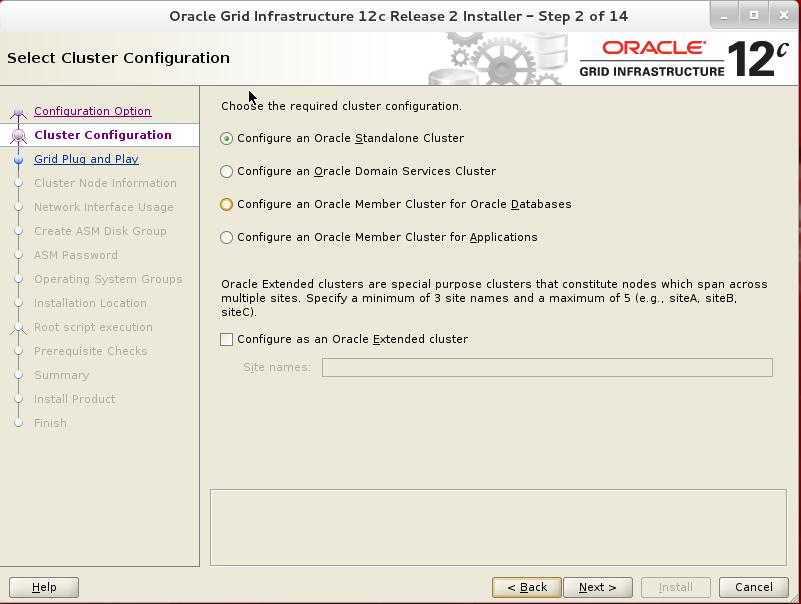
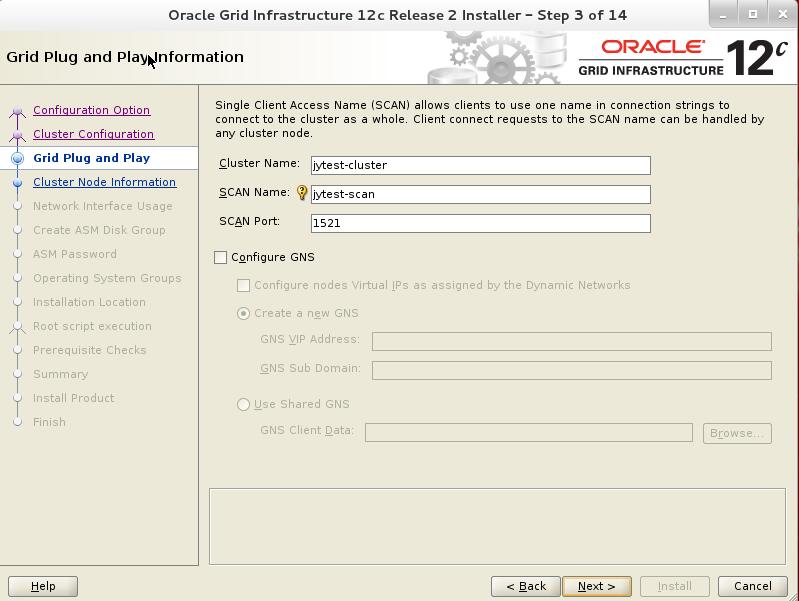
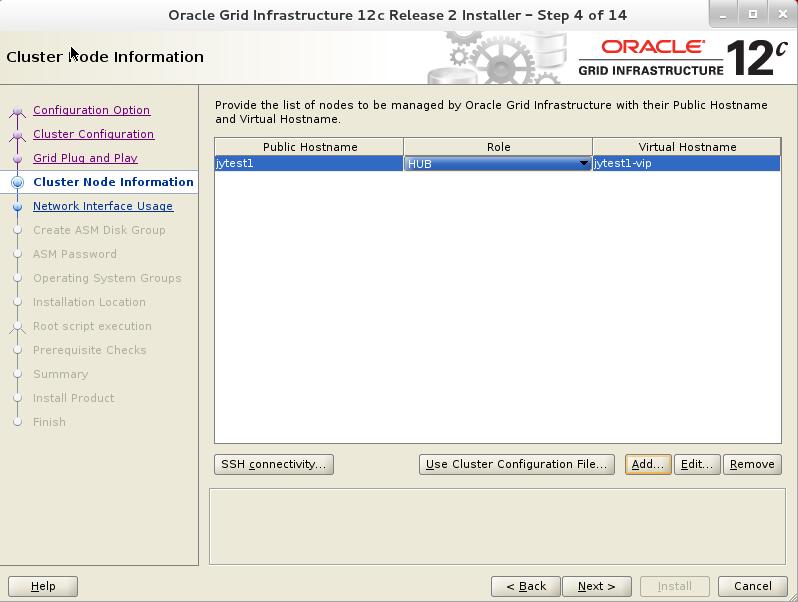
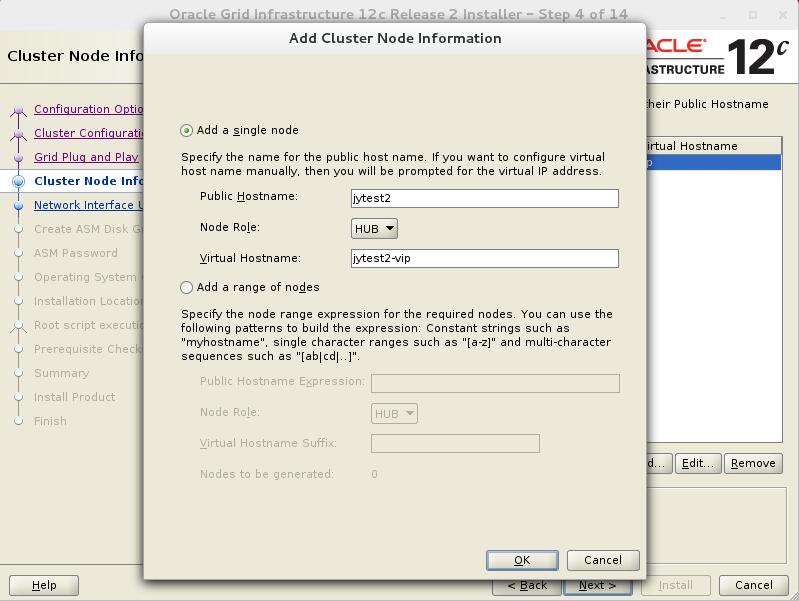
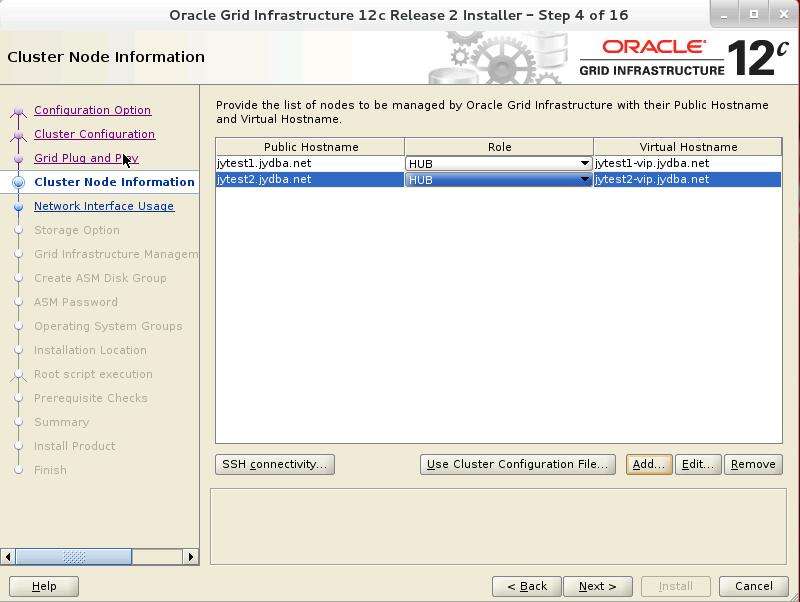
Oracle 12.2 联机重定义使用VPD策略的表并修改表的列名

下面的例子将演示联机重定义使用VPD策略的表,并修改表中的一个列名,原始表jy.orders的创建语句如下:

SQL> create table jy.orders(
  2  order_id number(12) primary key,
  3  order_date timestamp with local time zone constraint order_date_nn not null,
  4  order_mode varchar2(8),
  5  customer_id number(6) constraint order_customer_id_nn not null,
  6  order_status number(2),
  7  order_total number(8,2),
  8  sales_rep_id number(6),
  9  promotion_id number(6),
 10  constraint order_mode_lov
 11  check (order_mode in ('direct','online')),
 12  constraint order_total_min
 13  check (order_total >= 0));

Table created.

创建下面的jy.auth_orders函数来创建VPD策略

SQL> create or replace function jy.auth_orders(
  2  schema_var in varchar2,
  3  table_var in varchar2
  4  )
  5  return varchar2
  6  as
  7  return_val varchar2 (400);
  8  unm varchar2(30);
  9  begin
 10  select user into unm from dual;
 11  if (unm = 'jy') then
 12  return_val := null;
 13  else
 14  return_val := 'sales_rep_id = 159';
 15  end if;
 16  return return_val;
 17  end auth_orders;
 18  /

Function created.

下面执行dbms_rls.add_policy过程来使用jy.auth_orders函数来给原始表jy.orders指定VPD策略:

SQL> begin
  2  dbms_rls.add_policy(
  3  object_schema => 'jy',
  4  object_name => 'orders',
  5  policy_name => 'orders_policy',
  6  function_schema => 'jy',
  7  policy_function => 'auth_orders');
  8  end;
  9  /

PL/SQL procedure successfully completed.

在这个例子中,被重定义后表中的sales_rep_id列被修改为sale_pid。当在执行重定义过程如可修改一个或多个列或列的数据类型,那么在start_refef_table过程中对于copy_vpd_opt参数必须指定dbms_redefinition.cons_vpd_manual。

1.用要执行联机重定义操作的用户登录数据库

SQL> conn jy/jy@jypdb
Connected.

2.验证原始表是否可以执行联机重定义

SQL> begin
  2  dbms_redefinition.can_redef_table(
  3  uname => 'jy',
  4  tname => 'orders',
  5  options_flag => DBMS_REDEFINITION.CONS_USE_PK);
  6  end;
  7  /

PL/SQL procedure successfully completed.

3.创建中间表

SQL> create table jy.int_orders(
  2  order_id number(12),
  3  order_date timestamp with local time zone,
  4  order_mode varchar2(8),
  5  customer_id number(6),
  6  order_status number(2),
  7  order_total number(8,2),
  8  sales_pid number(6),
  9  promotion_id number(6));

Table created.

注意,在中间表中sales_rep_id列被修改为sales_pid。

4.开始联机重定义操作

SQL> begin
  2  dbms_redefinition.start_redef_table (
  3  uname => 'jy',
  4  orig_table => 'orders',
  5  int_table => 'int_orders',
  6  col_mapping => 'order_id order_id, order_date order_date, order_mode
  7  order_mode, customer_id customer_id, order_status
  8  order_status, order_total order_total, sales_rep_id
  9  sales_pid, promotion_id promotion_id',
 10  options_flag => dbms_redefinition.cons_use_pk,
 11  orderby_cols => null,
 12  part_name => null,
 13  copy_vpd_opt => dbms_redefinition.cons_vpd_manual);
 14  end;
 15  /

PL/SQL procedure successfully completed.

因为原始表与中间表存在不同的列名,那么copy_vpd_opt参数必须设置为dbms_redefinition.cons_vpd_manual。

5.对中间表创建VPD策略
5.1创建一个名为jy.auth_orders_sales_pid的函数来创建VPD策略,这里使用sales_pid列来代替sales_rep_id列。

SQL> create or replace function jy.auth_orders_sales_pid(
  2  schema_var in varchar2,
  3  table_var in varchar2
  4  )
  5  return varchar2
  6  as
  7  return_val varchar2 (400);
  8  unm varchar2(30);
  9  begin
 10  select user into unm from dual;
 11  if (unm = 'jy') then
 12  return_val := null;
 13  else
 14  return_val := 'sales_pid = 159';
 15  end if;
 16  return return_val;
 17  end auth_orders_sales_pid;
 18  /

Function created.

5.2执行dbms_rls.add_policy过程来使用jy.auth_orders_sales_pid函数来为中间表增加VPD策略

SQL> begin
  2  dbms_rls.add_policy (
  3  object_schema => 'jy',
  4  object_name => 'int_orders',
  5  policy_name => 'orders_policy',
  6  function_schema => 'jy',
  7  policy_function => 'auth_orders_sales_pid');
  8  end;
  9  /

PL/SQL procedure successfully completed.

6.复制依赖对象

SQL> declare
  2  num_errors pls_integer;
  3  begin
  4  dbms_redefinition.copy_table_dependents(
  5  uname => 'jy',
  6  orig_table => 'orders',
  7  int_table => 'int_orders',
  8  copy_indexes => dbms_redefinition.cons_orig_params,
  9  copy_triggers => true,
 10  copy_constraints => true,
 11  copy_privileges => true,
 12  ignore_errors => true,
 13  num_errors => num_errors);
 14  end;
 15  /

PL/SQL procedure successfully completed.

注意在这里ignore_errors参数被设置为true。原因是因为原始表对于列sales_rep_id存在索引与约束,并且在中间表中列被修改为sales_pid。

7.查询dba_redefinition_errors视图来检查是否存在错误

SQL> set long 8000
SQL> set pages 8000
SQL> column object_name heading 'object name' format a20
SQL> column base_table_name heading 'base table name' format a10
SQL> column ddl_txt heading 'ddl that caused error' format a40
SQL> select object_name, base_table_name, ddl_txt from dba_redefinition_errors;

no rows selected

8.可选操作同中间表

SQL> begin
  2  dbms_redefinition.sync_interim_table(
  3  uname => 'jy',
  4  orig_table => 'orders',
  5  int_table => 'int_orders');
  6  end;
  7  /

PL/SQL procedure successfully completed.

9.完成联机重定义操作

SQL> begin
  2  dbms_redefinition.finish_redef_table(
  3  uname => 'jy',
  4  orig_table => 'orders',
  5  int_table => 'int_orders');
  6  end;
  7  /

PL/SQL procedure successfully completed.

SQL> desc jy.orders
Name         Type                              Nullable Default Comments
------------ --------------------------------- -------- ------- --------
ORDER_ID     NUMBER(12)
ORDER_DATE   TIMESTAMP(6) WITH LOCAL TIME ZONE
ORDER_MODE   VARCHAR2(8)                       Y
CUSTOMER_ID  NUMBER(6)
ORDER_STATUS NUMBER(2)                         Y
ORDER_TOTAL  NUMBER(8,2)                       Y
SALES_PID    NUMBER(6)                         Y
PROMOTION_ID NUMBER(6)                         Y

10.等待任何查询中间表的语句执行完成后将其删除

SQL> drop table jy.int_orders;
Table dropped

到此重定义操作就完成了。
Oracle 12.2 联机重定义使用VPD策略的表并不修改表的任何列

下面的例子将演示如何联机重定义使用VPD策略的表。这个例将禁用所有的触发器而不修改表的列名或数据类型。原始表jy.employees的创建语句如下:

SQL> create table jy.employees(
  2  employee_id number(6) primary key,
  3  first_name varchar2(20),
  4  last_name varchar2(25)
  5  constraint emp_last_name_nn not null,
  6  email varchar2(25) constraint emp_email_nn not null,
  7  phone_number varchar2(20),
  8  hire_date date constraint emp_hire_date_nn not null,
  9  job_id varchar2(10) constraint emp_job_nn not null,
 10  salary number(8,2),
 11  commission_pct number(2,2),
 12  manager_id number(6),
 13  department_id number(4),
 14  constraint emp_salary_min check (salary > 0),
 15  constraint emp_email_uk unique (email)
 16  );

Table created.

使用下面的jy.auth_emp_dep_100函数来创建VPD策略

SQL> create or replace function jy.auth_emp_dep_100(
  2   schema_var in varchar2,
  3   table_var in varchar2
  4  )
  5  return varchar2
  6  as
  7   return_val varchar2 (400);
  8   unm varchar2(30);
  9   begin
 10    select user into unm from dual;
 11    if (unm = 'jy') then
 12     return_val := null;
 13    else
 14     return_val := 'department_id = 100';
 15    end if;
 16    return return_val;
 17   end auth_emp_dep_100;
 18  /

Function created.

执行dbms_rls_add_policy过程来对原始表jy.employees表使用jy.auth_emp_dep_100函数来指定VPD策略

SQL> begin
  2  dbms_rls.add_policy(
  3    object_schema => 'jy',
  4    object_name => 'employees',
  5    policy_name => 'employees_policy',
  6    function_schema => 'jy',
  7    policy_function => 'auth_emp_dep_100');
  8  end;
  9  /

PL/SQL procedure successfully completed.

在这个例子中,表jy.employees表重定义后将会禁用所有的触发器。注意重定义将不会修改列名或数据类型。因此在执行start_refef_table过程时copy_vpd_opt参数设置为dbms_redefinition.cons_vpd_auto。

1.用要执行联机重定义操作的用户登录数据库

SQL> conn jy/jy@jypdb
Connected.

2.验证原始表是否可以执行联机重定义

SQL> begin
  2   dbms_redefinition.can_redef_table('hr','employees',DBMS_REDEFINITION.CONS_USE_PK);
  3  end;
  4  /

PL/SQL procedure successfully completed.

3.创建中间表jy.int_employees

SQL> create table jy.int_employees(
  2   employee_id number(6),
  3   first_name varchar2(20),
  4   last_name varchar2(25),
  5   email varchar2(25),
  6   phone_number varchar2(20),
  7   hire_date date,
  8   job_id varchar2(10),
  9   salary number(8,2),
 10   commission_pct number(2,2),
 11   manager_id number(6),
 12   department_id number(4));

Table created.

4.开始联机重定义操作

SQL> begin
  2  dbms_redefinition.start_redef_table(
  3  uname => 'jy',
  4  orig_table => 'employees',
  5  int_table => 'int_employees',
  6  col_mapping => NULL,
  7  options_flag => DBMS_REDEFINITION.CONS_USE_PK,
  8  orderby_cols => NULL,
  9  part_name => NULL,
 10  copy_vpd_opt => DBMS_REDEFINITION.CONS_VPD_AUTO);
 11  end;
 12  /

PL/SQL procedure successfully completed.

当copy_vpd_opt参数被设置为dbms_redefinition.cons_vpd_auto时,只有表的所有者与调用联机重定义操作的用户可以在联机重定义期间访问该表。col_mapping参数设置为NULL。当copy_vpd_opt参数设置为dbms_redefinition.cons_vpd_auto时,col_mapping参数必须设置为NULL或’*’。

5.复制依赖对象

SQL> declare
  2  num_errors pls_integer;
  3  begin
  4  dbms_redefinition.copy_table_dependents(
  5  uname => 'jy',
  6  orig_table => 'employees',
  7  int_table => 'int_employees',
  8  copy_indexes => DBMS_REDEFINITION.CONS_ORIG_PARAMS,
  9  copy_triggers => TRUE,
 10  copy_constraints => TRUE,
 11  copy_privileges => TRUE,
 12  ignore_errors => FALSE,
 13  num_errors => num_errors);
 14  end;
 15  /

PL/SQL procedure successfully completed.

6.对中间表禁用所有的触发器

SQL> alter table jy.int_employees disable all triggers;

Table altered.

7.可选操作同步中间表

SQL> begin
  2  dbms_redefinition.sync_interim_table(
  3  uname => 'jy',
  4  orig_table => 'employees',
  5  int_table => 'int_employees');
  6  end;
  7  /

PL/SQL procedure successfully completed.

8.完成联机重定义操作

SQL> begin
  2  dbms_redefinition.finish_redef_table(
  3  uname => 'jy',
  4  orig_table => 'employees',
  5  int_table => 'int_employees');
  6  end;
  7  /

PL/SQL procedure successfully completed.

9.等待任何查询中间表的语句执行完成后将其删除

SQL> drop table jy.int_employees;
Table dropped

到此重定义操作就完成了。
Oracle 12.2 联机重定义多个分区并将其移动到不同的表空间中

下面的例子将演示如何联机重定义多个分区并将基于范围分区的表salestable的两个分区移动到新表空间中。原始表jy.salestable的创建如下:

SQL> create table jy.salestable
  2  (s_productid number,
  3  s_saledate date,
  4  s_custid number,
  5  s_totalprice number)
  6  tablespace users
  7  partition by range(s_saledate)
  8  (partition sal10q1 values less than (to_date('01-apr-2010', 'dd-mon-yyyy')),
  9  partition sal10q2 values less than (to_date('01-jul-2010', 'dd-mon-yyyy')),
 10  partition sal10q3 values less than (to_date('01-oct-2010', 'dd-mon-yyyy')),
 11  partition sal10q4 values less than (to_date('01-jan-2011', 'dd-mon-yyyy')));

Table created.

这个例子会将分区sal10q1与sal10q2移动到example表空间中。sal10q3与sal10q4分区不会被移动。为了移动分区表空间example必须存在。这里已经先创建好了表空间example。对原始表jy.salestable创建一个本地分区索引,操作如下:

SQL> create index jy.sales_index on jy.salestable (s_saledate, s_productid, s_custid) local;

Index created.

注意,在12.2中也可以执行alter table … move partition … online语句来将分区移动到其它表空间中。

联机重定义操作如下:
1.用要执行联机重定义操作的用户登录数据库

SQL> conn jy/jy@jypdb
Connected.

2.验证原始表jy.salestable是否可以执行联机重定义

SQL> begin
  2  dbms_redefinition.can_redef_table(
  3    uname => 'jy',
  4    tname => 'salestable',
  5    options_flag => DBMS_REDEFINITION.CONS_USE_ROWID,
  6    part_name => 'sal10q1, sal10q2');
  7  end;
  8  /

PL/SQL procedure successfully completed.

3.在新表空间example中创建中间表。因为这是对分区执行联机重定义,因此中间表不能是分区表。

SQL> create table jy.int_salestb1
  2  (s_productid number,
  3  s_saledate date,
  4  s_custid number,
  5  s_totalprice number)
  6  tablespace example;

Table created.

SQL> create table jy.int_salestb2
  2  (s_productid number,
  3  s_saledate date,
  4  s_custid number,
  5  s_totalprice number)
  6  tablespace example;

Table created.

4.使用rowid方法来执行重定义操作

SQL> begin
  2  dbms_redefinition.start_redef_table(
  3    uname => 'jy',
  4    orig_table => 'salestable',
  5    int_table => 'int_salestb1, int_salestb2',
  6    col_mapping => NULL,
  7    options_flag => DBMS_REDEFINITION.CONS_USE_ROWID,
  8    part_name => 'sal10q1, sal10q2',
  9    continue_after_errors => TRUE);
 10  end;
 11  /

PL/SQL procedure successfully completed.

注意,part_name参数用来指定所有要重定义的分区,int_table参数用来指定每个分区所对应的中间表,continue_after_errors参数被设置为true,因此重定义操作即使当某个特定分区遇到错误也会继续执行。

5.在中间表上创建任何本地索引

SQL> create index jy.int_sales1_index on jy.int_salestb1
  2  (s_saledate, s_productid, s_custid)
  3  tablespace example;

Index created.

SQL> create index jy.int_sales2_index on jy.int_salestb2
  2  (s_saledate, s_productid, s_custid)
  3  tablespace example;

Index created.

6.可选操作同步中间表

SQL> begin
  2  dbms_redefinition.sync_interim_table(
  3    uname => 'jy',
  4    orig_table => 'salestable',
  5    int_table => 'int_salestb1, int_salestb2',
  6    part_name => 'sal10q1, sal10q2',
  7    continue_after_errors => TRUE);
  8  end;
  9  /

PL/SQL procedure successfully completed.

7.完成重定义操作

SQL> begin
  2  dbms_redefinition.finish_redef_table(
  3    uname => 'jy',
  4    orig_table => 'salestable',
  5    int_table => 'int_salestb1, int_salestb2',
  6    part_name => 'sal10q1, sal10q2',
  7    continue_after_errors => TRUE);
  8  end;
  9  /

PL/SQL procedure successfully completed.

8.可选操作,查询dba_redefinition_status视图来确保对每个分区都重定义操作成功

SQL> select base_table_owner, base_table_name, operation, status from dba_redefinition_status;

no rows selected

如果有任何分区重定义失败,视图dba_redefinition_errors会显示出错误原因,修正故障重新执行联机重定义操作。

下面的查询显示了表jy.salestable有两个分区已经移动到了新的表空间example中了

SQL> select partition_name, tablespace_name from dba_tab_partitions where table_name = 'SALESTABLE' and table_owner='JY';
PARTITION_NAME                                                                   TABLESPACE_NAME
-------------------------------------------------------------------------------- ------------------------------
SAL10Q1                                                                          EXAMPLE
SAL10Q2                                                                          EXAMPLE
SAL10Q3                                                                          USERS
SAL10Q4                                                                          USERS

到此联机重定义操作完成

Oracle 12.2使用手动创建与注册依赖对象来执行联机重定义

下面的例子将使用手动创建与注册依赖对象的方法来执行联机重定义操作,原始表创建如下:

SQL> create table jy.t1(c1 number);
Table created

SQL> create index jy.t1_idx_1 on jy.t1(c1);
Index created

假设在联机重定义之后列c1变为了c2。在这种情况下,使用copy_table_dependents过程试图对中间表的c1列创建索引t1_idx,因为不存在列c1就会出现错误。因此必须在列c2上创建索引然后进行注册。

联机重定义操作如下:
1.用要执行联机重定义操作的用户登录数据库

SQL> conn jy/jy@jypdb
Connected.

2.验证原始表t1是否可以执行联机重定义操作

SQL> begin
  2  dbms_redefinition.can_redef_table(
  3    uname => 'jy',
  4    tname => 't1',
  5    options_flag => DBMS_REDEFINITION.CONS_USE_ROWID);
  6  end;
  7  /

PL/SQL procedure successfully completed.

3.手动创建中间表jy.int_t1并且在列c2上创建索引jy.int_t1_idx_1

SQL> create table jy.int_t1(c2 number);

Table created.

SQL> create index jy.int_t1_idx_1 on jy.int_t1(c2);

Index created.

4.开始执行联机重定义操作

SQL> begin
  2  dbms_redefinition.start_redef_table(
  3    uname => 'jy',
  4    orig_table => 't1',
  5    int_table => 'int_t1',
  6    col_mapping => 'c1 c2',
  7    options_flag => DBMS_REDEFINITION.CONS_USE_ROWID);
  8  end;
  9  /

PL/SQL procedure successfully completed.

5.注册原始(索引t1_idx_1)与中间(int_t1_idx_1)依赖对象

SQL> begin
  2  dbms_redefinition.register_dependent_object(
  3    uname => 'jy',
  4    orig_table => 't1',
  5    int_table => 'int_t1',
  6    dep_type => DBMS_REDEFINITION.CONS_INDEX,
  7    dep_owner => 'jy',
  8    dep_orig_name => 't1_idx_1',
  9    dep_int_name => 'int_t1_idx_1');
 10  end;
 11  /

PL/SQL procedure successfully completed.

6.复制依赖对象

SQL> declare
  2  num_errors pls_integer;
  3  begin
  4  dbms_redefinition.copy_table_dependents(
  5    uname => 'jy',
  6    orig_table => 't1',
  7    int_table => 'int_t1',
  8    copy_indexes => DBMS_REDEFINITION.CONS_ORIG_PARAMS,
  9    copy_triggers => TRUE,
 10    copy_constraints => TRUE,
 11    copy_privileges => TRUE,
 12    ignore_errors => TRUE,
 13    num_errors => num_errors);
 14  end;
 15  /

PL/SQL procedure successfully completed.

7.可选操作同步中间表

SQL> begin
  2  dbms_redefinition.sync_interim_table(
  3    uname => 'jy',
  4    orig_table => 't1',
  5    int_table => 'int_t1');
  6  end;
  7  /

PL/SQL procedure successfully completed.

8.完成联机重定义操作

SQL> begin
  2  dbms_redefinition.finish_redef_table(
  3    uname => 'jy',
  4    orig_table => 't1',
  5    int_table => 'int_t1');
  6  end;
  7  /

PL/SQL procedure successfully completed.
SQL> select dbms_metadata.get_ddl(object_type =>'TABLE',name =>'T1',schema => 'JY') from dual;

DBMS_METADATA.GET_DDL(OBJECT_TYPE=>'TABLE',NAME=>'T1',SCHEMA=>'JY')
--------------------------------------------------------------------------------

  CREATE TABLE "JY"."T1"
   (    "C2" NUMBER
   ) SEGMENT CREATION DEFERRED
  PCTFREE 10 PCTUSED 40 INITRANS 1 MAXTRANS 255
 NOCOMPRESS LOGGING
  TABLESPACE "TEST"


1 row selected.

可以看到表jy.t1已经成功能联机重定义

9.等待任何查询中间表的语句执行完成后将其删除

SQL> desc jy.t1
Name Type   Nullable Default Comments
---- ------ -------- ------- --------
C2   NUMBER Y

SQL> drop table jy.t1 purge;
Table dropped

到此重定义操作就完成了。
Oracle 12.2使用对象数据类型来重定义表

Oracle 12.2使用对象数据类型来重定义表,下面的例子将重定义表将列改变为对象属性,原始表为customer,定义如下:

SQL> create table jy.customer(
  2  cid number not null,
  3  name varchar2(30),
  4  street varchar2(100),
  5  city varchar2(30),
  6  state varchar2(2),
  7  zip number(5)
  8  );
Table created

SQL> alter table jy.customer add constraint customer_pk primary key(cid);
Table altered

创建新的对象类型

SQL> create type jy.addr_t as object
  2  (
  3  street varchar2(100),
  4  city   varchar2(30),
  5  state  varchar2(2),
  6  zip    number(5,0)
  7  );
  8
  9  /
Type created

联机重定义操作如下:
1.用要执行联机重定义操作的用户登录数据库

SQL> conn jy/jy@jypdb
Connected.

2.验证表是否可以执行联机重定义,可以使用主键或伪主键来执行验证操作。

SQL> begin
  2  dbms_redefinition.can_redef_table(
  3   uname => 'jy',
  4   tname =>'customer',
  5   options_flag => DBMS_REDEFINITION.CONS_USE_PK);
  6  end;
  7  /
PL/SQL procedure successfully completed

3.创建中间表jy.int_customer

SQL> create table jy.int_customer
  2  (
  3  cid  number,
  4  name varchar2(30),
  5  addr addr_t
  6  );
Table created

4.因为customer是一个非常大的表,为了让下一步操作启用并行执行以下语句:

SQL> alter session force parallel dml parallel 4;
Session altered
SQL> alter session force parallel query parallel 4;
Session altered

5.使用主键来执行重定义操作

SQL> begin
  2  dbms_redefinition.start_redef_table(
  3    uname => 'jy',
  4    orig_table => 'customer',
  5    int_table => 'int_customer',
  6    col_mapping => 'cid cid, name name,
  7    addr_t(street, city, state, zip) addr');
  8  end;
  9  /
PL/SQL procedure successfully completed

6.复制依赖对象

SQL> declare
  2  num_errors pls_integer;
  3  begin
  4  dbms_redefinition.copy_table_dependents(
  5    uname => 'jy',
  6    orig_table => 'customer',
  7    int_table => 'int_customer',
  8    copy_indexes => DBMS_REDEFINITION.CONS_ORIG_PARAMS,
  9    copy_triggers => TRUE,
 10    copy_constraints => TRUE,
 11    copy_privileges => TRUE,
 12    ignore_errors => FALSE,
 13    num_errors => num_errors,
 14    copy_statistics => TRUE);
 15  end;
 16  /
PL/SQL procedure successfully completed

7.可选操作同步中间表

SQL> begin
  2  dbms_redefinition.sync_interim_table(
  3    uname => 'jy',
  4    orig_table => 'customer',
  5    int_table => 'int_customer');
  6  end;
  7  /
PL/SQL procedure successfully completed

8.完成重定义操作

SQL> begin
  2  dbms_redefinition.finish_redef_table(
  3    uname => 'jy',
  4    orig_table => 'customer',
  5    int_table => 'int_customer');
  6  end;
  7  /
PL/SQL procedure successfully completed

SQL> select dbms_metadata.get_ddl(object_type =>'TABLE',name =>'CUSTOMER',schema => 'JY') from dual;

DBMS_METADATA.GET_DDL(OBJECT_TYPE=>'TABLE',NAME=>'CUSTOMER',SCHEMA=>'JY')
--------------------------------------------------------------------------------

  CREATE TABLE "JY"."CUSTOMER"
   (    "CID" NUMBER NOT NULL ENABLE,
        "NAME" VARCHAR2(30),
        "ADDR" "JY"."ADDR_T" ,
         CONSTRAINT "CUSTOMER_PK" PRIMARY KEY ("CID")
  USING INDEX PCTFREE 10 INITRANS 2 MAXTRANS 255 COMPUTE STATISTICS
  STORAGE(INITIAL 65536 NEXT 1048576 MINEXTENTS 1 MAXEXTENTS 2147483645
  PCTINCREASE 0 FREELISTS 1 FREELIST GROUPS 1
  BUFFER_POOL DEFAULT FLASH_CACHE DEFAULT CELL_FLASH_CACHE DEFAULT)
  TABLESPACE "TEST"  ENABLE
   ) SEGMENT CREATION IMMEDIATE
  PCTFREE 10 PCTUSED 40 INITRANS 1 MAXTRANS 255
 NOCOMPRESS LOGGING
  STORAGE(INITIAL 65536 NEXT 1048576 MINEXTENTS 1 MAXEXTENTS 2147483645
  PCTINCREASE 0 FREELISTS 1 FREELIST GROUPS 1
  BUFFER_POOL DEFAULT FLASH_CACHE DEFAULT CELL_FLASH_CACHE DEFAULT)
  TABLESPACE "TEST"


1 row selected.

可以看到表jy.customer已经成功能联机重定义

9.等待任何查询中间表的语句执行完成后将其删除

SQL> desc jy.customer
Name Type         Nullable Default Comments
---- ------------ -------- ------- --------
CID  NUMBER
NAME VARCHAR2(30) Y
ADDR ADDR_T       Y

SQL> drop table jy.customer purge;
Table dropped

到此重定义操作就完成了。
使用dbms_redefinition.redef_table过程来重定义表的存储属性

Oracle 12.2使用dbms_redefinition.redef_table过程来重定义表的存储属性,下面的例子将介绍使用redef_table过程来联机重定义表的存储属性,原始表名为test,存储在pm方案中:

SQL> desc pm.test
Name    Type      Nullable Default Comments
------- --------- -------- ------- --------
AD_ID   NUMBER(6) Y
AD_TEXT CLOB      Y

表test中的LOB数据类型列ad_text使用BasicFile LOB存储,执行下面的语句来创建索引test_idx

SQL> create index pm.test_idx on pm.test(ad_id) tablespace users;
Index created

表test将按以下规则进行联机重定义:
.表使用高级行压缩来进行压缩
.表的存储表空间从users变为example
.索引压缩使用compress 1选项
.索引的存储表空间也从users变为example
.表中的LOB类型列ad_text使用compress high选项进行压缩
.LOB类型列ad_text的存储空间从users变为example
.LOB类型列ad_text变为SecureFiles LOB存储

联机重定义操作如下:
1.用要执行联机重定义操作的用户登录数据库

SQL> conn pm/pm@jypdb
Connected.

2.执行dbms_redefinition.redef_table过程

SQL> exec dbms_redefinition.redef_table(uname =>'PM',tname =>'TEST',table_compression_type =>'ROW STORE COMPRESS ADVANCED',table_part_tablespace =>'EXAMPLE',index_key_compression_type =>'COMPRESS 1',index_tablespace =>'EXAMPLE',lob_compression_type =>'COMPRESS HIGH',lob_tablespace =>'EXAMPLE',lob_store_as =>'SECUREFILE');

PL/SQL procedure successfully completed.

3.查看重定义结果

SQL> set pagesize 0
SQL> set long 900000
SQL> select dbms_metadata.get_ddl(object_type =>'TABLE',name =>'TEST',schema => 'PM') from dual;

  CREATE TABLE "PM"."TEST"
   (    "AD_ID" NUMBER(6,0),
        "AD_TEXT" CLOB
   ) SEGMENT CREATION DEFERRED
  PCTFREE 10 PCTUSED 40 INITRANS 1 MAXTRANS 255
 ROW STORE COMPRESS ADVANCED LOGGING
  TABLESPACE "EXAMPLE"
 LOB ("AD_TEXT") STORE AS SECUREFILE (
  TABLESPACE "EXAMPLE" ENABLE STORAGE IN ROW CHUNK 8192
  NOCACHE LOGGING  COMPRESS HIGH  KEEP_DUPLICATES )


1 row selected.

Oracle 12CR2 dbca -silent -createDatabase

在Oracle Linux 7.1,数据库为Oracle 12cr2中使用dbca静默方式创建数据库的语法如下:

[oracle@jytest1 ~]$ dbca -silent -createDatabase help
help
        -createDatabase - Command to Create a database.
                -responseFile | (-gdbName,-templateName)
                -responseFile - 
                -gdbName 
                -templateName 
                [-characterSet ]
                [-createAsContainerDatabase ]
                        [-numberOfPDBs ]
                        [-pdbAdminPassword ]
                        [-pdbName ]
                        [-pdbOptions ]
                        [-pdbStorageMAXSizeInMB ]
                        [-pdbStorageMAXTempSizeInMB ]
                        [-useLocalUndoForPDBs   Specify false to disable local undo tablespace for PDBs.]
                [-createListener ]
                [-customScripts ]
                [-databaseConfigType ]
                        [-RACOneNodeServiceName ]
                [-databaseType ]
                [-datafileDestination ]
                [-datafileJarLocation ]
                [-dbOptions ]
                [-dvConfiguration  Specify true to configure and enable database vault.]
                        -dvUserName 
                        -dvUserPassword 
                        [-dvAccountManagerName ]
                        [-dvAccountManagerPassword ]
                [-emConfiguration ]
                        [-dbsnmpPassword ]
                        [-emExpressPort ]
                        [-emPassword ]
                        [-emUser ]
                        [-omsHost ]
                        [-omsPort ]
                [-enableArchive  Specify true to enable archive>]
                        [-archiveLogDest ]
                        [-archiveLogMode ]
                [-initParams ]
                        [-initParamsEscapeChar ]
                [-listeners ]
                [-memoryMgmtType ]
                [-memoryPercentage | -totalMemory]
                [-memoryPercentage ]
                [-totalMemory ]
                [-nationalCharacterSet ]
                [-nodelist ]
                [-olsConfiguration  Specify true to configure and enable Oracle Label Security.]
                        [-configureWithOID This flag configures Oracle Label Security with OID.]
                [-oracleHomeUserName ]
                [-oracleHomeUserPassword ]
                [-policyManaged | -adminManaged]
                [-policyManaged ]
                        -serverPoolName 
                        [-createServerPool ]
                                [-cardinality ]
                                [-force ]
                                [-pqCardinality ]
                                [-pqPoolName ]
                        [-pqPoolName ]
                [-adminManaged ]
                [-recoveryAreaDestination ]
                        [-recoveryAreaSize ]
                [-redoLogFileSize ]
                [-registerWithDirService ]
                        -dirServiceUserName 
                        [-databaseCN ]
                        [-dirServicePassword ]
                        [-walletPassword ]
                [-runCVUChecks <specify "true" in order to run Cluster Verification Utility checks periodically for RAC databases.>]
                [-sampleSchema ]
                [-sid ]
                [-storageType < FS | ASM >]
                        -datafileDestination 
                        [-asmsnmpPassword ]
                [-sysPassword ]
                [-systemPassword ]
                [-useOMF  Specify true to use Oracle-Managed Files.]
                [-useWalletForDBCredentials  Specify true to load database credentials from wallet]
                        -dbCredentialsWalletLocation 
                        [-dbCredentialsWalletPassword ]
                [-variables ]
                [-variablesFile ]

使用dbca -silent方式来创建RAC数据库jycs,节点信息为jytest1,jytest2,磁盘组为test

[oracle@jytest1 ~]$ dbca -silent -createDatabase -templateName General_Purpose.dbc -gdbName jycs -sid jycs -createAsContainerDatabase true -numberOfPDBs 1 -pdbName jycspdb -sysPassword xxzx7817600 -systemPassword xxzx7817600 -datafileDestination 'test/' -redoLogFileSize 50 -recoveryAreaDestination 'test/' -storageType -responseFile NO_VALUE  -characterset ZHS16GBK -nationalCharacterSet AL16UTF16 -initParams log_archive_dest_1='location=+test/'  -sampleSchema true -automaticMemoryManagement false -totalMemory 1024 -databaseType MULTIPURPOSE -nodeinfo jytest1,jytest2
[FATAL] [DBT-06007] The specified location (FRA Location) is invalid.
   CAUSE: The specified location is not found on the system or is detected to be a file.

上面报错的原因是因为如果使用ASM磁盘组来存储数据文件时,指定磁盘组名称时,其格式为+diskgroup_name,而在11g中为diskgroup_name

修磁盘组格式后再次执行

[oracle@jytest1 ~]$ dbca -silent -createDatabase -templateName General_Purpose.dbc -gdbName jycs -sid jycs -createAsContainerDatabase true -numberOfPDBs 1 -pdbName jycspdb -sysPassword xxzx7817600 -systemPassword xxzx7817600 -datafileDestination '+test/' -redoLogFileSize 50 -recoveryAreaDestination '+test/' -storageType ASM    -characterset ZHS16GBK -nationalCharacterSet AL16UTF16 -initParams log_archive_dest_1='location=+test/'  -sampleSchema true -automaticMemoryManagement false -totalMemory 1024 -databaseType MULTIPURPOSE -nodeinfo jytest1,jytest2 
Enter PDBADMIN User Password: 

[WARNING] [DBT-06208] The 'SYS' password entered does not conform to the Oracle recommended standards.
   CAUSE: 
a. Oracle recommends that the password entered should be at least 8 characters in length, contain at least 1 uppercase character, 1 lower case character and 1 digit 

[0-9].
b.The password entered is a keyword that Oracle does not recommend to be used as password
   ACTION: Specify a strong password. If required refer Oracle documentation for guidelines.
[WARNING] [DBT-06208] The 'SYSTEM' password entered does not conform to the Oracle recommended standards.
   CAUSE: 
a. Oracle recommends that the password entered should be at least 8 characters in length, contain at least 1 uppercase character, 1 lower case character and 1 digit 

[0-9].
b.The password entered is a keyword that Oracle does not recommend to be used as password
   ACTION: Specify a strong password. If required refer Oracle documentation for guidelines.
[WARNING] [DBT-06208] The 'PDBADMIN' password entered does not conform to the Oracle recommended standards.
   CAUSE: 
a. Oracle recommends that the password entered should be at least 8 characters in length, contain at least 1 uppercase character, 1 lower case character and 1 digit 

[0-9].
b.The password entered is a keyword that Oracle does not recommend to be used as password
   ACTION: Specify a strong password. If required refer Oracle documentation for guidelines.
[WARNING] [DBT-09102] Target environment does not meet some optional requirements.
   CAUSE: Some of the optional prerequisites are not met. See logs for details. /u01/app/oracle/cfgtoollogs/dbca/trace.log_2017-04-26_09-55-10-AM
   ACTION: Find the appropriate configuration from the log file or from the installation guide to meet the prerequisites and fix this manually.
Copying database files
DBCA Operation failed.
Look at the log file "/u01/app/oracle/cfgtoollogs/dbca/jycs/jycs.log" for further details.

查看具体错误原因,说是检查磁盘组test是否注册到集群中

[root@jytest1 ~]# cat /u01/app/oracle/cfgtoollogs/dbca/jycs/jycs0.log
[ 2017-04-26 10:21:55.793 CST ] Copying database files
[ 2017-04-26 10:21:55.942 CST ] PRCR-1070 : Failed to check if resource ora.TEST/.dg is registered
CRS-5161 : The entity name contains invalid characters.

检查集群资源可以看到磁盘组test状态正常,两个节点都为online状态,而由于12c中的语法多了listeners参数,所以猜测是由于没有指定监听程序的原因

[grid@jytest1 ~]$ crsctl stat res -t
--------------------------------------------------------------------------------
Name           Target  State        Server                   State details       
--------------------------------------------------------------------------------
Local Resources
--------------------------------------------------------------------------------
ora.ASMNET1LSNR_ASM.lsnr
               ONLINE  ONLINE       jytest1                  STABLE
               ONLINE  ONLINE       jytest2                  STABLE
ora.CRS.dg
               ONLINE  ONLINE       jytest1                  STABLE
               ONLINE  ONLINE       jytest2                  STABLE
ora.DATA.dg
               ONLINE  ONLINE       jytest1                  STABLE
               ONLINE  ONLINE       jytest2                  STABLE
ora.LISTENER.lsnr
               ONLINE  ONLINE       jytest1                  STABLE
               ONLINE  ONLINE       jytest2                  STABLE
ora.TEST.dg
               ONLINE  ONLINE       jytest1                  STABLE
               ONLINE  ONLINE       jytest2                  STABLE
ora.chad
               ONLINE  ONLINE       jytest1                  STABLE
               ONLINE  ONLINE       jytest2                  STABLE
ora.net1.network
               ONLINE  ONLINE       jytest1                  STABLE
               ONLINE  ONLINE       jytest2                  STABLE
ora.ons
               ONLINE  ONLINE       jytest1                  STABLE
               ONLINE  ONLINE       jytest2                  STABLE
ora.proxy_advm
               OFFLINE OFFLINE      jytest1                  STABLE
               OFFLINE OFFLINE      jytest2                  STABLE
--------------------------------------------------------------------------------
Cluster Resources
--------------------------------------------------------------------------------
ora.LISTENER_SCAN1.lsnr
      1        ONLINE  ONLINE       jytest2                  STABLE
ora.LISTENER_SCAN2.lsnr
      1        ONLINE  ONLINE       jytest1                  STABLE
ora.LISTENER_SCAN3.lsnr
      1        ONLINE  ONLINE       jytest1                  STABLE
ora.MGMTLSNR
      1        ONLINE  ONLINE       jytest1                  169.254.123.145 88.8
                                                             8.88.1,STABLE
ora.asm
      1        ONLINE  ONLINE       jytest1                  Started,STABLE
      2        ONLINE  ONLINE       jytest2                  Started,STABLE
      3        OFFLINE OFFLINE                               STABLE
ora.cvu
      1        ONLINE  ONLINE       jytest1                  STABLE
ora.jy.db
      1        ONLINE  ONLINE       jytest1                  Open,HOME=/u01/app/o
                                                             racle/product/12.2.0
                                                             /db,STABLE
      2        ONLINE  ONLINE       jytest2                  Open,HOME=/u01/app/o
                                                             racle/product/12.2.0
                                                             /db,STABLE
ora.jytest1.vip
      1        ONLINE  ONLINE       jytest1                  STABLE
ora.jytest2.vip
      1        ONLINE  ONLINE       jytest2                  STABLE
ora.mgmtdb
      1        ONLINE  ONLINE       jytest1                  Open,STABLE
ora.orcl.db
      1        ONLINE  ONLINE       jytest1                  Open,HOME=/u01/app/o
                                                             racle/product/12.2.0
                                                             /db/,STABLE
      2        ONLINE  ONLINE       jytest2                  Open,HOME=/u01/app/o
                                                             racle/product/12.2.0
                                                             /db/,STABLE
ora.qosmserver
      1        ONLINE  ONLINE       jytest1                  STABLE
ora.scan1.vip
      1        ONLINE  ONLINE       jytest2                  STABLE
ora.scan2.vip
      1        ONLINE  ONLINE       jytest1                  STABLE
ora.scan3.vip
      1        ONLINE  ONLINE       jytest1                  STABLE
--------------------------------------------------------------------------------

增加listeners参数后再次执行

[oracle@jytest1 ~]$ dbca -silent -createDatabase -templateName General_Purpose.dbc -gdbName jycs -sid jycs -databaseConfigType RAC -createAsContainerDatabase true -numberOfPDBs 1 -pdbName jycspdb -sysPassword xxzx7817600 -systemPassword xxzx7817600  -redoLogFileSize 50   -storageType ASM -datafileDestination '+test/' -
asmsnmpPassword xxzx7817600   -characterset ZHS16GBK -nationalCharacterSet AL16UTF16 -initParams log_archive_dest_1='location=+TEST/',sga_target=1G,sga_max_size=1G  -sampleSchema true  -listeners ASMNET1LSNR_ASM,LISTENER,LISTENER_SCAN1 -automaticMemoryManagement false -totalMemory 2048 -databaseType MULTIPURPOSE -nodeinfo jytest1,jytest2 
Enter PDBADMIN User Password: 

[WARNING] [DBT-06208] The 'SYS' password entered does not conform to the Oracle recommended standards.
   CAUSE: 
a. Oracle recommends that the password entered should be at least 8 characters in length, contain at least 1 uppercase character, 1 lower case character and 1 digit 

[0-9].
b.The password entered is a keyword that Oracle does not recommend to be used as password
   ACTION: Specify a strong password. If required refer Oracle documentation for guidelines.
[WARNING] [DBT-06208] The 'SYSTEM' password entered does not conform to the Oracle recommended standards.
   CAUSE: 
a. Oracle recommends that the password entered should be at least 8 characters in length, contain at least 1 uppercase character, 1 lower case character and 1 digit 

[0-9].
b.The password entered is a keyword that Oracle does not recommend to be used as password
   ACTION: Specify a strong password. If required refer Oracle documentation for guidelines.
[WARNING] [DBT-06208] The 'PDBADMIN' password entered does not conform to the Oracle recommended standards.
   CAUSE: 
a. Oracle recommends that the password entered should be at least 8 characters in length, contain at least 1 uppercase character, 1 lower case character and 1 digit 

[0-9].
b.The password entered is a keyword that Oracle does not recommend to be used as password
   ACTION: Specify a strong password. If required refer Oracle documentation for guidelines.
[WARNING] [DBT-09102] Target environment does not meet some optional requirements.
   CAUSE: Some of the optional prerequisites are not met. See logs for details. /u01/app/oracle/cfgtoollogs/dbca/trace.log_2017-04-26_12-34-00-PM
   ACTION: Find the appropriate configuration from the log file or from the installation guide to meet the prerequisites and fix this manually.
Copying database files
1% complete
11% complete
21% complete
Creating and starting Oracle instance
23% complete
25% complete
26% complete
27% complete
30% complete
33% complete
34% complete
35% complete
Creating cluster database views
37% complete
50% complete
Completing Database Creation
51% complete
53% complete
55% complete
57% complete
Creating Pluggable Databases
61% complete
78% complete
Executing Post Configuration Actions
100% complete
Look at the log file "/u01/app/oracle/cfgtoollogs/dbca/jycs/jycs3.log" for further details.

数据库创建成功,检查是否将数据库jycs注册到集群中,从下面的结果可以看到已经注册了

[grid@jytest1 ~]$ crsctl stat res -t
--------------------------------------------------------------------------------
Name           Target  State        Server                   State details       
--------------------------------------------------------------------------------
Local Resources
--------------------------------------------------------------------------------
ora.ASMNET1LSNR_ASM.lsnr
               ONLINE  ONLINE       jytest1                  STABLE
               ONLINE  ONLINE       jytest2                  STABLE
ora.CRS.dg
               ONLINE  ONLINE       jytest1                  STABLE
               ONLINE  ONLINE       jytest2                  STABLE
ora.DATA.dg
               ONLINE  ONLINE       jytest1                  STABLE
               ONLINE  ONLINE       jytest2                  STABLE
ora.LISTENER.lsnr
               ONLINE  ONLINE       jytest1                  STABLE
               ONLINE  ONLINE       jytest2                  STABLE
ora.TEST.dg
               ONLINE  ONLINE       jytest1                  STABLE
               ONLINE  ONLINE       jytest2                  STABLE
ora.chad
               ONLINE  ONLINE       jytest1                  STABLE
               ONLINE  ONLINE       jytest2                  STABLE
ora.net1.network
               ONLINE  ONLINE       jytest1                  STABLE
               ONLINE  ONLINE       jytest2                  STABLE
ora.ons
               ONLINE  ONLINE       jytest1                  STABLE
               ONLINE  ONLINE       jytest2                  STABLE
ora.proxy_advm
               OFFLINE OFFLINE      jytest1                  STABLE
               OFFLINE OFFLINE      jytest2                  STABLE
--------------------------------------------------------------------------------
Cluster Resources
--------------------------------------------------------------------------------
ora.LISTENER_SCAN1.lsnr
      1        ONLINE  ONLINE       jytest2                  STABLE
ora.LISTENER_SCAN2.lsnr
      1        ONLINE  ONLINE       jytest1                  STABLE
ora.LISTENER_SCAN3.lsnr
      1        ONLINE  ONLINE       jytest1                  STABLE
ora.MGMTLSNR
      1        ONLINE  ONLINE       jytest1                  169.254.123.145 88.8
                                                             8.88.1,STABLE
ora.asm
      1        ONLINE  ONLINE       jytest1                  Started,STABLE
      2        ONLINE  ONLINE       jytest2                  Started,STABLE
      3        OFFLINE OFFLINE                               STABLE
ora.cvu
      1        ONLINE  ONLINE       jytest1                  STABLE
ora.jy.db
      1        ONLINE  ONLINE       jytest1                  Open,HOME=/u01/app/o
                                                             racle/product/12.2.0
                                                             /db,STABLE
      2        ONLINE  ONLINE       jytest2                  Open,HOME=/u01/app/o
                                                             racle/product/12.2.0
                                                             /db,STABLE
ora.jycs.db
      1        ONLINE  ONLINE       jytest1                  Open,HOME=/u01/app/o
                                                             racle/product/12.2.0
                                                             /db,STABLE
      2        ONLINE  ONLINE       jytest2                  Open,HOME=/u01/app/o
                                                             racle/product/12.2.0
                                                             /db,STABLE
ora.jytest1.vip
      1        ONLINE  ONLINE       jytest1                  STABLE
ora.jytest2.vip
      1        ONLINE  ONLINE       jytest2                  STABLE
ora.mgmtdb
      1        ONLINE  ONLINE       jytest1                  Open,STABLE
ora.orcl.db
      1        OFFLINE OFFLINE                               Instance Shutdown,ST
                                                             ABLE
      2        OFFLINE OFFLINE                               Instance Shutdown,ST
                                                             ABLE
ora.qosmserver
      1        ONLINE  ONLINE       jytest1                  STABLE
ora.scan1.vip
      1        ONLINE  ONLINE       jytest2                  STABLE
ora.scan2.vip
      1        ONLINE  ONLINE       jytest1                  STABLE
ora.scan3.vip
      1        ONLINE  ONLINE       jytest1                  STABLE
--------------------------------------------------------------------------------

小结:
12c中使用dbca -silent方式来创建数据库之前的版本相比,增加了listeners参数,减少了指定ASM磁盘组的diskGroupName参数,并且指定磁盘组名称时需要指定+号,之前版本不需要指定+号。当然还增加了许多其它参数,有兴趣的可以测试一下。
Oracle 12Cr2 Using CloneDB to clone a database

这里将介绍如何使用Oracle 12CR2的CloneDB功能来克隆一个数据库,生产库orcl的Oracle home目录为/u01/app/oracle/product/12.2.0/db,数据库的备份文件存储在/u01/app/oracle/backup/目录中,CloneDB库clonedb的oracle home目录也为/u01/app/oracle/product/12.2.0/db

操作步骤如下:
1.对生产库执行备份,因为生产库jy启用了归档所以执行联机备份,使用backup as copy来备份生产库的数据文件,只备份数据文件。

SQL> col name for a50
SQL> select file#,rfile#,name from v$datafile;

     FILE#     RFILE# NAME
---------- ---------- --------------------------------------------------
         1          1 +DATA/ORCL/DATAFILE/system.280.941831569
         2          2 +DATA/ORCL/DATAFILE/sysaux.281.941831647
         3          3 +DATA/ORCL/DATAFILE/undotbs1.282.941831677
         4          4 +DATA/ORCL/DATAFILE/users.284.941831687

SQL> select name from v$tablespace;

NAME
--------------------------------------------------
SYSTEM
SYSAUX
UNDOTBS1
TEMP
USERS


RMAN> backup as copy database format '/u01/app/oracle/backup/%U';

Starting backup at 25-APR-17
using channel ORA_DISK_1
channel ORA_DISK_1: starting datafile copy
input datafile file number=00001 name=+DATA/ORCL/DATAFILE/system.280.941831569
output file name=/u01/app/oracle/backup/data_D-ORCL_I-1469612247_TS-SYSTEM_FNO-1_1vs2jnif tag=TAG20170425T210621 RECID=17 STAMP=942267998
channel ORA_DISK_1: datafile copy complete, elapsed time: 00:00:15
channel ORA_DISK_1: starting datafile copy
input datafile file number=00002 name=+DATA/ORCL/DATAFILE/sysaux.281.941831647
output file name=/u01/app/oracle/backup/data_D-ORCL_I-1469612247_TS-SYSAUX_FNO-2_20s2jnj1 tag=TAG20170425T210621 RECID=18 STAMP=942268013
channel ORA_DISK_1: datafile copy complete, elapsed time: 00:00:15
channel ORA_DISK_1: starting datafile copy
input datafile file number=00004 name=+DATA/ORCL/DATAFILE/users.284.941831687
output file name=/u01/app/oracle/backup/data_D-ORCL_I-1469612247_TS-USERS_FNO-4_21s2jnjj tag=TAG20170425T210621 RECID=19 STAMP=942268023
channel ORA_DISK_1: datafile copy complete, elapsed time: 00:00:07
channel ORA_DISK_1: starting datafile copy
input datafile file number=00003 name=+DATA/ORCL/DATAFILE/undotbs1.282.941831677
output file name=/u01/app/oracle/backup/data_D-ORCL_I-1469612247_TS-UNDOTBS1_FNO-3_22s2jnjs tag=TAG20170425T210621 RECID=20 STAMP=942268033
channel ORA_DISK_1: datafile copy complete, elapsed time: 00:00:08
Finished backup at 25-APR-17

Starting Control File and SPFILE Autobackup at 25-APR-17
piece handle=/u01/app/oracle/product/12.2.0/db/dbs/c-1469612247-20170425-03 comment=NONE
Finished Control File and SPFILE Autobackup at 25-APR-17

2.创建pfile参数文件

SQL> create pfile='/u01/app/oracle/product/12.2.0/db/dbs/initclonedb.ora' from spfile;

File created.

3.创建克隆库clonedb
3.1 手动生成创建CloneDB库的SQL脚本
3.1.1 以sysdba或sysbackup管理权限连接到生产库

[oracle@jytest3 ~]$ export ORACLE_SID=orcl
[oracle@jytest3 ~]$ sqlplus / as sysdba

SQL*Plus: Release 12.2.0.1.0 Production on Mon Apr 24 19:56:40 2017

Copyright (c) 1982, 2016, Oracle.  All rights reserved.


Connected to:
Oracle Database 12c Enterprise Edition Release 12.2.0.1.0 - 64bit Production

3.1.2 执行以下命令来对生产库的控制文件生成备份

SQL> alter database backup controlfile to trace;

Database altered.

SQL> oradebug setmypid
Statement processed.

SQL> oradebug tracefile_name
/u01/app/oracle/diag/rdbms/orcl/orcl/trace/orcl_ora_22801.trc

3.1.3 将生成的跟踪文件中的startup nomount与create controlfile语句复制到一个新创建的脚本中。

[oracle@jytest3 dbs]$ vi create_clonedb.sql
STARTUP NOMOUNT
CREATE CONTROLFILE REUSE DATABASE "ORCL" NORESETLOGS  ARCHIVELOG
    MAXLOGFILES 16
    MAXLOGMEMBERS 2
    MAXDATAFILES 30
    MAXINSTANCES 1
    MAXLOGHISTORY 292
LOGFILE
  GROUP 1 '+DATA/ORCL/ONLINELOG/group_1.278.941831529'  SIZE 100M BLOCKSIZE 512,
  GROUP 2 '+DATA/ORCL/ONLINELOG/group_2.279.941831545'  SIZE 100M BLOCKSIZE 512
-- STANDBY LOGFILE
DATAFILE
  '+DATA/ORCL/DATAFILE/system.280.941831569',
  '+DATA/ORCL/DATAFILE/sysaux.281.941831647',
  '+DATA/ORCL/DATAFILE/undotbs1.282.941831677',
  '+DATA/ORCL/DATAFILE/users.284.941831687'
CHARACTER SET ZHS16GBK
;

3.1.4 统计图脚本create_clonedb.sql,将数据库名从orcl修改为clonedb,将日志文件目录从+data/orcl/onlinelog/修改为+data/clonedb/onlinelog,将数据文件目录从+data/orcl/datafile修改为备份目录/u01/app/oracle/backup/,修改之后的脚本内容如下:

STARTUP NOMOUNT pfile=/u01/app/oracle/product/12.2.0/db/dbs/initclonedb.ora

CREATE CONTROLFILE REUSE SET DATABASE clonedb RESETLOGS  ARCHIVELOG
    MAXLOGFILES 16
    MAXLOGMEMBERS 2
    MAXDATAFILES 30
    MAXINSTANCES 1
    MAXLOGHISTORY 292
LOGFILE
  GROUP 1 '+data/clonedb/onlinelog/redo1.log'  SIZE 100M BLOCKSIZE 512,
  GROUP 2 '+data/clonedb/onlinelog/redo2.log'  SIZE 100M BLOCKSIZE 512
-- STANDBY LOGFILE
DATAFILE
  '/u01/app/oracle/backup/data_D-ORCL_I-1469612247_TS-SYSTEM_FNO-1_1vs2jnif',
  '/u01/app/oracle/backup/data_D-ORCL_I-1469612247_TS-SYSAUX_FNO-2_20s2jnj1',
  '/u01/app/oracle/backup/data_D-ORCL_I-1469612247_TS-USERS_FNO-4_21s2jnjj',
  '/u01/app/oracle/backup/data_D-ORCL_I-1469612247_TS-UNDOTBS1_FNO-3_22s2jnjs'
CHARACTER SET ZHS16GBK
;

3.1.5 将生成的参数文件pfile复制到clonedb库所存储参数文件的位置,因为这里生产库与clonedb库的Oracle home目录相同,所以不用复制,这里需要参数文件修改为clonedb库所使用的相关参数,并且要增加CLONEDB=TRUE这个参数

[oracle@jytest3 dbs]$ vi initclonedb.ora
orcl.__data_transfer_cache_size=0
orcl.__db_cache_size=427819008
orcl.__inmemory_ext_roarea=0
orcl.__inmemory_ext_rwarea=0
orcl.__java_pool_size=4194304
orcl.__large_pool_size=20971520
orcl.__oracle_base='/u01/app/oracle'#ORACLE_BASE set from environment
orcl.__pga_aggregate_target=432013312
orcl.__sga_target=641728512
orcl.__shared_io_pool_size=0
orcl.__shared_pool_size=171966464
orcl.__streams_pool_size=0
*.control_files='+data/clonedb/controlfile/control01.ctl','+data/clonedb/controlfile/control02.ctl'
*.db_create_file_dest='+DATA'
*.db_name=clonedb
*.log_archive_dest_1='location=+data/arch/clonedb/'
*.memory_target=1G
clonedb=true

3.1.6 使用SQL*PLUS并以sysdba管理权限连接到clonedb库

[oracle@jytest3 ~]$ export ORACLE_SID=clonedb
[oracle@jytest3 ~]$ sqlplus / as sysdba

SQL*Plus: Release 12.2.0.1.0 Production on Mon Apr 24 20:24:52 2017

Copyright (c) 1982, 2016, Oracle.  All rights reserved.

Connected to an idle instance.

3.1.7 运行之前创建的create_clonedb.sql脚本

SQL> @/u01/app/oracle/product/12.2.0/db/dbs/create_clonedb.sql
ORACLE instance started.

Total System Global Area 1073741824 bytes
Fixed Size                  8628936 bytes
Variable Size             629146936 bytes
Database Buffers          427819008 bytes
Redo Buffers                8146944 bytes

Control file created.

3.1.8 对于在备份目录中的每个数据文件,执行dbms_dnfs.clonedb_renamefile过程,srcfile指定备份文件,destfile指定目标文件

SQL> BEGIN
  2  DBMS_DNFS.CLONEDB_RENAMEFILE(srcfile => '/u01/app/oracle/backup/data_D-ORCL_I-1469612247_TS-SYSTEM_FNO-1_1vs2jnif',destfile => 

'+DATA/clonedb/datafile/system.dbf');
  3  DBMS_DNFS.CLONEDB_RENAMEFILE(srcfile => '/u01/app/oracle/backup/data_D-ORCL_I-1469612247_TS-SYSAUX_FNO-2_20s2jnj1',destfile => 

'+DATA/clonedb/datafile/sysaux.dbf');
  4  DBMS_DNFS.CLONEDB_RENAMEFILE(srcfile => '/u01/app/oracle/backup/data_D-ORCL_I-1469612247_TS-USERS_FNO-4_21s2jnjj',destfile => '+DATA/clonedb/datafile/users.dbf');
  5  DBMS_DNFS.CLONEDB_RENAMEFILE(srcfile => '/u01/app/oracle/backup/data_D-ORCL_I-1469612247_TS-UNDOTBS1_FNO-3_22s2jnjs',destfile => 

'+DATA/clonedb/datafile/undotbs1.dbf');
  6  END;
  7  /

PL/SQL procedure successfully completed.

4.如果使用联机备份创建clonedb库,那么需要对clonedb执行恢复操作。如果是使用的完全脱机备份或使用的是backup as copy备份,则不需要执行恢复操作,因为我这是使用的backup as copy备份。需要执行恢复,执行以下命令:

SQL> recover database using backup controlfile until cancel;
ORA-00279: change 630593 generated at 04/25/2017 21:06:24 needed for thread 1
ORA-00289: suggestion : +DATA/arch/clonedb/1_22_941831511.dbf
ORA-00280: change 630593 for thread 1 is in sequence #22


Specify log: {=suggested | filename | AUTO | CANCEL}

这里需要查询生产库当前正在使用的联机重做日志文件

SQL> set long 300
SQL> set linesize 300
SQL> select * from v$log;

    GROUP#    THREAD#  SEQUENCE#      BYTES  BLOCKSIZE    MEMBERS ARC STATUS           FIRST_CHANGE# FIRST_TIME   NEXT_CHANGE# NEXT_TIME        CON_ID
---------- ---------- ---------- ---------- ---------- ---------- --- ---------------- ------------- ------------ ------------ ------------ ----------
         1          1         21  104857600        512          1 YES INACTIVE                627446 25-APR-17          630528 25-APR-17             0
         2          1         22  104857600        512          1 NO  CURRENT                 630528 25-APR-17      1.8447E+19                       0

SQL> col member for a50
SQL> select * from v$logfile;

    GROUP# STATUS  TYPE    MEMBER                                             IS_     CON_ID
---------- ------- ------- -------------------------------------------------- --- ----------
         1         ONLINE  +DATA/ORCL/ONLINELOG/group_1.278.941831529         NO           0
         2         ONLINE  +DATA/ORCL/ONLINELOG/group_2.279.941831545         NO           0


+DATA/ORCL/ONLINELOG/group_2.279.941831545
Log applied.
Media recovery complete.
SQL> 

5.执行以下命令open数据库

SQL> alter database open resetlogs;

Database altered.

到此克隆数据库的所要操作完成。

Oracle使用联机重定义来给表增加新列与分区

因为需要将一张上亿我们要记录的表修改为分区表,所以尝试使用联机重定义来给表增加新列与分区的方法来实现,下面是一个测试的例子,操作系统是Oracle Linux 7.1,数据库为12.2.0.1,原始表为emp_redef,该表存储在hr方案中:

SQL> desc hr.emp_redef
Name          Type         Nullable Default Comments
------------- ------------ -------- ------- --------
EMPLOYEE_ID   NUMBER(6)
FIRST_NAME    VARCHAR2(20) Y
LAST_NAME     VARCHAR2(25)
JOB_ID        VARCHAR2(10)
DEPARTMENT_ID NUMBER(4)    Y

表emp_redef将按以下规则来进行联机重定义:
.增加新列mgr,hiredate,sal与bonus
.新列bonus被初始化为0
.列department_id的值由10开始增加
.表将被重定义为范围分区表,分区键为employee_id。

联机重定义操作如下:
1.用要执行联机重定义操作的用户登录数据库

SQL> conn pm/pm@jypdb
Connected.

2.验证表emp_redef是否可以执行联机重定义。在这种情况下,可以使用主键或伪主键来来进行验证。

SQL> exec dbms_redefinition.can_redef_table(uname=>'HR',tname=>'EMP_REDEF',options_flag=>dbms_redefinition.cons_use_pk);

PL/SQL procedure successfully completed.

3.创建一个中间表hr.int_emp_redef

SQL> create table hr.int_emp_redef
  2  (
  3    employee_id   NUMBER(6) not null,
  4    first_name    VARCHAR2(20),
  5    last_name     VARCHAR2(25) not null,
  6    job_id        VARCHAR2(10) not null,
  7    department_id NUMBER(4) not null,
  8    mgr           NUMBER(5),
  9    hiredate      DATE DEFAULT(sysdate),
 10    sal           NUMBER(7,2),
 11    bonus         NUMBER(7,2) DEFAULT(0)
 12  )
 13  partition by range(employee_id)
 14  (
 15  partition emp200 values less than(200) tablespace users,
 16  partition emp400 values less than(400) tablespace users
 17  );
Table created

4.开始重定义操作

SQL> begin
  2  dbms_redefinition.start_redef_table(
  3    uname => 'hr',
  4    orig_table => 'emp_redef',
  5    int_table => 'int_emp_redef',
  6    col_mapping => 'employee_id employee_id, first_name first_name,last_name last_name, job_id job_id, department_id+10 department_id,0 bonus',
  7    options_flag => DBMS_REDEFINITION.CONS_USE_PK);
  8  end;
  9  /

PL/SQL procedure successfully completed.

5.复制依赖对象(自动对表hr.int_emp_redef创建任何触发器,索引,物化视图日志,授权与约束)

SQL> declare
  2  num_errors pls_integer;
  3  begin
  4  dbms_redefinition.copy_table_dependents(
  5    uname => 'hr',
  6    orig_table => 'emp_redef',
  7    int_table => 'int_emp_redef',
  8    copy_indexes => DBMS_REDEFINITION.CONS_ORIG_PARAMS,
  9    copy_triggers => TRUE,
 10    copy_constraints => TRUE,
 11    copy_privileges => TRUE,
 12    ignore_errors => TRUE,
 13    num_errors => num_errors);
 14  end;
 15  /

PL/SQL procedure successfully completed.

注意,在调用这个过程时ignore_errors参数需要设置为TRUE。原因是中间表创建了主键约束,并且当执行copye_table_dependents过程来试图从原始表复制主键约束与索引时会发生错误。可以忽略这些错误,但必须执行下一步操作中的查询来查看是否还存在其它错误。

6.查询dba_redefinition_errors视图来查看错误信息

SQL> set long 8000
SQL> set pages 8000
SQL> column object_name heading 'object name' format a20
SQL> column base_table_name heading 'base table name' format a10
SQL> column ddl_txt heading 'ddl that caused error' format a40
SQL> select object_name, base_table_name, ddl_txt from dba_redefinition_errors;

object name          base table ddl that caused error
-------------------- ---------- ----------------------------------------
SYS_C0023200         EMP_REDEF  ALTER TABLE "HR"."INT_EMP_REDEF" MODIFY
                                ("LAST_NAME" CONSTRAINT "TMP$$_SYS_C0023
                                2000" NOT NULL ENABLE NOVALIDATE)

SYS_C0023201         EMP_REDEF  ALTER TABLE "HR"."INT_EMP_REDEF" MODIFY
                                ("JOB_ID" CONSTRAINT "TMP$$_SYS_C0023201
                                0" NOT NULL ENABLE NOVALIDATE)


2 rows selected.

上面的错误信息是说中间表的last_name与job_id列为not null,而原因表为null,这种错误可以忽略。

7.同步中间表hr.int_emp_redef

SQL> begin
  2  dbms_redefinition.sync_interim_table(
  3    uname => 'hr',
  4    orig_table => 'emp_redef',
  5    int_table => 'int_emp_redef');
  6  end;
  7  /

PL/SQL procedure successfully completed.

8.完成重定义操作

SQL> begin
  2  dbms_redefinition.finish_redef_table(
  3   uname => 'hr',
  4   orig_table => 'emp_redef',
  5   int_table => 'int_emp_redef');
  6  end;
  7  /

PL/SQL procedure successfully completed.

表hr.emp_redef只会以排他模式被锁定很短的时间来结束重定义操作。在操作完成后,表hr.emp_redef将使用hr.int_emp_redef表的所有属性来重定义。

SQL> desc hr.emp_redef
Name          Type         Nullable Default   Comments
------------- ------------ -------- --------- --------
EMPLOYEE_ID   NUMBER(6)
FIRST_NAME    VARCHAR2(20) Y
LAST_NAME     VARCHAR2(25)
JOB_ID        VARCHAR2(10)
DEPARTMENT_ID NUMBER(4)
MGR           NUMBER(5)    Y
HIREDATE      DATE         Y        (sysdate)
SAL           NUMBER(7,2)  Y
BONUS         NUMBER(7,2)  Y        (0)

SQL> select dbms_metadata.get_ddl(object_type =>'TABLE',name =>'EMP_REDEF',schema => 'HR') from dual;

DBMS_METADATA.GET_DDL(OBJECT_TYPE=>'TABLE',NAME=>'EMP_REDEF',SCHEMA=>'HR')
--------------------------------------------------------------------------------

  CREATE TABLE "HR"."EMP_REDEF"
   (    "EMPLOYEE_ID" NUMBER(6,0) NOT NULL ENABLE,
        "FIRST_NAME" VARCHAR2(20),
        "LAST_NAME" VARCHAR2(25) NOT NULL ENABLE,
        "JOB_ID" VARCHAR2(10) NOT NULL ENABLE,
        "DEPARTMENT_ID" NUMBER(4,0) NOT NULL ENABLE,
        "MGR" NUMBER(5,0),
        "HIREDATE" DATE DEFAULT (sysdate),
        "SAL" NUMBER(7,2),
        "BONUS" NUMBER(7,2) DEFAULT (0),
         CONSTRAINT "EMP_REDEF_EMP_ID_PK" PRIMARY KEY ("EMPLOYEE_ID")
  USING INDEX PCTFREE 10 INITRANS 2 MAXTRANS 255 COMPUTE STATISTICS
  STORAGE(INITIAL 65536 NEXT 1048576 MINEXTENTS 1 MAXEXTENTS 2147483645
  PCTINCREASE 0 FREELISTS 1 FREELIST GROUPS 1
  BUFFER_POOL DEFAULT FLASH_CACHE DEFAULT CELL_FLASH_CACHE DEFAULT)
  TABLESPACE "USERS"  ENABLE
   ) PCTFREE 10 PCTUSED 40 INITRANS 1 MAXTRANS 255
  STORAGE(
  BUFFER_POOL DEFAULT FLASH_CACHE DEFAULT CELL_FLASH_CACHE DEFAULT)
  TABLESPACE "USERS"
  PARTITION BY RANGE ("EMPLOYEE_ID")
 (PARTITION "EMP200"  VALUES LESS THAN (200) SEGMENT CREATION IMMEDIATE
  PCTFREE 10 PCTUSED 40 INITRANS 1 MAXTRANS 255
 NOCOMPRESS LOGGING
  STORAGE(INITIAL 8388608 NEXT 1048576 MINEXTENTS 1 MAXEXTENTS 2147483645
  PCTINCREASE 0 FREELISTS 1 FREELIST GROUPS 1
  BUFFER_POOL DEFAULT FLASH_CACHE DEFAULT CELL_FLASH_CACHE DEFAULT)
  TABLESPACE "USERS" ,
 PARTITION "EMP400"  VALUES LESS THAN (400) SEGMENT CREATION IMMEDIATE
  PCTFREE 10 PCTUSED 40 INITRANS 1 MAXTRANS 255
 NOCOMPRESS LOGGING
  STORAGE(INITIAL 8388608 NEXT 1048576 MINEXTENTS 1 MAXEXTENTS 2147483645
  PCTINCREASE 0 FREELISTS 1 FREELIST GROUPS 1
  BUFFER_POOL DEFAULT FLASH_CACHE DEFAULT CELL_FLASH_CACHE DEFAULT)
  TABLESPACE "USERS" )


1 row selected.

可以看到表hr.emp_redef已经成功能联机重定义

9.等任何查询中间表的语句执行完成后将其删除,而且中间表在重定义后其结构就变成了原始表的表结构

SQL> desc hr.int_emp_redef
Name          Type         Nullable Default Comments
------------- ------------ -------- ------- --------
EMPLOYEE_ID   NUMBER(6)    Y
FIRST_NAME    VARCHAR2(20) Y
LAST_NAME     VARCHAR2(25)
JOB_ID        VARCHAR2(10)
DEPARTMENT_ID NUMBER(4)    Y

SQL> drop table hr.int_emp_redef purge;
Table dropped

到此,联机重定义表hr.emp_redef就操作完成。

Oracle Database 12c Release 2 (12.2) RAC On Oracle Linux 7 Using VMware

安装环境为Oracle Linux 7.1,Oracle版本为12.2.0.1,下面是RAC环境的IP配置

ip地址          主机名                   类型     解析方式 
10.10.10.171  jytest1 .jydba.net      public   DNS或etc/hosts 
10.10.10.172  jytest2 .jydba.net      public   DNS或etc/hosts 
88.88.88.1    jytest1 .jydba.net      private  DNS或etc/hosts 
88.88.88.2    jytest2 .jydba.net      private  DNS或etc/hosts 
10.10.10.175  jytest1 .jydba.net      virtual  DNS或etc/hosts 
10.10.10.176  jytest2 .jydba.net      virtual  DNS或etc/hosts
10.10.10.177  jytest-scan.jydba.net   scan     DNS或etc/hosts
10.10.10.178  jytest-scan.jydba.net   scan     DNS或etc/hosts
10.10.10.179  jytest-scan.jydba.net   scan     DNS或etc/hosts

[root@jytest1 soft]# cat /etc/hosts

127.0.0.1    localhost.jydba.net localhost
10.10.10.171 jytest1.jydba.net jytest1
10.10.10.172 jytest2.jydba.net jytest2

10.10.10.175 jytest1-vip.jydba.net jytest1-vip
10.10.10.176 jytest2-vip.jydba.net jytest2-vip

88.88.88.1   jytest1-priv.jydba.net jytest1-priv
88.88.88.2   jytest2-priv.jydba.net jytest2-priv

10.10.10.177 jytest-scan.jydba.net  jytest-scan
10.10.10.178 jytest-scan.jydba.net  jytest-scan
10.10.10.179 jytest-scan.jydba.net  jytest-scan 
[root@jytest2 ~]# cat /etc/hosts

127.0.0.1    localhost.jydba.net localhost
10.10.10.171 jytest1.jydba.net jytest1
10.10.10.172 jytest2.jydba.net jytest2

10.10.10.175 jytest1-vip.jydba.net jytest1-vip
10.10.10.176 jytest2-vip.jydba.net jytest2-vip

88.88.88.1   jytest1-priv.jydba.net jytest1-priv
88.88.88.2   jytest2-priv.jydba.net jytest2-priv

10.10.10.177 jytest-scan.jydba.net  jytest-scan
10.10.10.178 jytest-scan.jydba.net  jytest-scan
10.10.10.179 jytest-scan.jydba.net  jytest-scan 

开启ftp

[root@jytest1 vsftpd]# service vsftpd start
Redirecting to /bin/systemctl start  vsftpd.service

[root@jytest2 vsftpd]# service vsftpd start
Redirecting to /bin/systemctl start  vsftpd.service

下面这幅图显示的是/etc/vsftpd/ftpusers的内容,我们需要做的是在“root”字样前面添加注释符,通过这种手段来打开root用户对ftp功能的使用。同理,需要编辑的文件还有user_list:

[root@jytest1 ~]# vi ftpusers
# Users that are not allowed to login via ftp
#root
bin
daemon
adm
lp
sync
shutdown
halt
mail
news
uucp
operator
games
nobody

[root@jytest1 ~]## vi user_list
# vsftpd userlist
# If userlist_deny=NO, only allow users in this file
# If userlist_deny=YES (default), never allow users in this file, and
# do not even prompt for a password.
# Note that the default vsftpd pam config also checks /etc/vsftpd/ftpusers
# for users that are denied.
#root
bin
daemon
adm
lp
sync
shutdown
halt
mail
news
uucp
operator
games
nobody

通过编辑这两个文件,我们就可以在windows下以root用户登陆到虚拟机里同一网段的linux系统下

创建用户组

[root@jytest1 ~]# groupadd -g 1006 asmadmin
[root@jytest1 ~]# groupadd -g 1007 asmdba
[root@jytest1 ~]# groupadd -g 1008 asmoper
[root@jytest1 ~]# groupadd -g 1009 dba
[root@jytest1 ~]# groupadd -g 1010 oper
[root@jytest1 ~]# groupadd -g 1011 oinstall
[root@jytest1 ~]# groupadd -g 1012 backupdba
[root@jytest1 ~]# groupadd -g 1013 dgdba
[root@jytest1 ~]# groupadd -g 1014 kmdba
[root@jytest1 ~]# groupadd -g 1015 racdba


[root@jytest2 ~]# groupadd -g 1006 asmadmin
[root@jytest2 ~]# groupadd -g 1007 asmdba
[root@jytest2 ~]# groupadd -g 1008 asmoper
[root@jytest2 ~]# groupadd -g 1009 dba
[root@jytest2 ~]# groupadd -g 1010 oper
[root@jytest2 ~]# groupadd -g 1011 oinstall
[root@jytest2 ~]# groupadd -g 1012 backupdba
[root@jytest2 ~]# groupadd -g 1013 dgdba
[root@jytest2 ~]# groupadd -g 1014 kmdba
[root@jytest2 ~]# groupadd -g 1015 racdba

创建用户

[root@jytest1 ~]#useradd  -u 1001 -g oinstall -G dba,asmdba,backupdba,dgdba,kmdba,racdba,oper oracle
[root@jytest1 ~]#useradd  -u 1002 -g oinstall -G asmadmin,asmdba,asmoper,dba grid

[root@jytest2 ~]#useradd  -u 1001 -g oinstall -G dba,asmdba,backupdba,dgdba,kmdba,racdba,oper oracle
[root@jytest2 ~]#useradd  -u 1002 -g oinstall -G asmadmin,asmdba,asmoper,dba grid


[root@jytest1 /]# passwd grid
Changing password for user grid.
New password: 
BAD PASSWORD: The password is shorter than 8 characters
Retype new password: 
passwd: all authentication tokens updated successfully.
You have new mail in /var/spool/mail/root
[root@jytest1 /]# passwd oracle
Changing password for user oracle.
New password: 
BAD PASSWORD: The password is shorter than 8 characters
Retype new password: 
passwd: all authentication tokens updated successfully.

[root@jytest2 /]# passwd grid
Changing password for user grid.
New password: 
BAD PASSWORD: The password is shorter than 8 characters
Retype new password: 
passwd: all authentication tokens updated successfully.
[root@jytest2 /]# passwd oracle
Changing password for user oracle.
New password: 
BAD PASSWORD: The password is shorter than 8 characters
Retype new password: 
passwd: all authentication tokens updated successfully.

配置ASM所需磁盘,编辑/etc/udev/rules.d/99-my-asmdevices.rules配置文件

[root@jytest1 ~]# vi /etc/udev/rules.d/99-my-asmdevices.rules

KERNEL=="sd*[!0-9]", ENV{DEVTYPE}=="disk", SUBSYSTEM=="block",  PROGRAM=="/usr/lib/udev/scsi_id -g -u -d $devnode",  RESULT=="36000c293af84fb49683bbfd9a0b377ec", RUN+="/bin/sh -c 'mknod /dev/asmdisk01 b  $major $minor; chown grid:asmadmin /dev/asmdisk01; chmod 0660 /dev/asmdisk01'"

KERNEL=="sd*[!0-9]", ENV{DEVTYPE}=="disk", SUBSYSTEM=="block",  PROGRAM=="/usr/lib/udev/scsi_id -g -u -d $devnode",  RESULT=="36000c290196d69c481a2cf191d33868c", RUN+="/bin/sh -c 'mknod /dev/asmdisk02 b  $major $minor; chown grid:oinstall /dev/asmdisk02; chmod 0660 /dev/asmdisk02'"

KERNEL=="sd*[!0-9]", ENV{DEVTYPE}=="disk", SUBSYSTEM=="block",  PROGRAM=="/usr/lib/udev/scsi_id -g -u -d $devnode",  RESULT=="36000c2903ffae4d3865722d108fadc96", RUN+="/bin/sh -c 'mknod /dev/asmdisk03 b  $major $minor; chown grid:oinstall /dev/asmdisk03; chmod 0660 /dev/asmdisk03'"

KERNEL=="sd*[!0-9]", ENV{DEVTYPE}=="disk", SUBSYSTEM=="block",  PROGRAM=="/usr/lib/udev/scsi_id -g -u -d $devnode",  RESULT=="36000c29e1b47900ecad6f1458a3585ed", RUN+="/bin/sh -c 'mknod /dev/asmdisk04 b  $major $minor; chown grid:oinstall /dev/asmdisk04; chmod 0660 /dev/asmdisk04'"

KERNEL=="sd*[!0-9]", ENV{DEVTYPE}=="disk", SUBSYSTEM=="block",  PROGRAM=="/usr/lib/udev/scsi_id -g -u -d $devnode",  RESULT=="36000c29748d41fffbdddafdea6eb64bb", RUN+="/bin/sh -c 'mknod /dev/asmdisk05 b  $major $minor; chown grid:oinstall /dev/asmdisk05; chmod 0660 /dev/asmdisk05'"

KERNEL=="sd*[!0-9]", ENV{DEVTYPE}=="disk", SUBSYSTEM=="block",  PROGRAM=="/usr/lib/udev/scsi_id -g -u -d $devnode",  RESULT=="36000c2985afa13536000f5887b9acb92", RUN+="/bin/sh -c 'mknod /dev/asmdisk06 b  $major $minor; chown grid:oinstall /dev/asmdisk06; chmod 0660 /dev/asmdisk06'"

[root@jytest2 ~]# vi /etc/udev/rules.d/99-my-asmdevices.rules

KERNEL=="sd*[!0-9]", ENV{DEVTYPE}=="disk", SUBSYSTEM=="block",  PROGRAM=="/usr/lib/udev/scsi_id -g -u -d $devnode",  RESULT=="36000c293af84fb49683bbfd9a0b377ec", RUN+="/bin/sh -c 'mknod /dev/asmdisk01 b  $major $minor; chown grid:asmadmin /dev/asmdisk01; chmod 0660 /dev/asmdisk01'"

KERNEL=="sd*[!0-9]", ENV{DEVTYPE}=="disk", SUBSYSTEM=="block",  PROGRAM=="/usr/lib/udev/scsi_id -g -u -d $devnode",  RESULT=="36000c290196d69c481a2cf191d33868c", RUN+="/bin/sh -c 'mknod /dev/asmdisk02 b  $major $minor; chown grid:oinstall /dev/asmdisk02; chmod 0660 /dev/asmdisk02'"

KERNEL=="sd*[!0-9]", ENV{DEVTYPE}=="disk", SUBSYSTEM=="block",  PROGRAM=="/usr/lib/udev/scsi_id -g -u -d $devnode",  RESULT=="36000c2903ffae4d3865722d108fadc96", RUN+="/bin/sh -c 'mknod /dev/asmdisk03 b  $major $minor; chown grid:oinstall /dev/asmdisk03; chmod 0660 /dev/asmdisk03'"

KERNEL=="sd*[!0-9]", ENV{DEVTYPE}=="disk", SUBSYSTEM=="block",  PROGRAM=="/usr/lib/udev/scsi_id -g -u -d $devnode",  RESULT=="36000c29e1b47900ecad6f1458a3585ed", RUN+="/bin/sh -c 'mknod /dev/asmdisk04 b  $major $minor; chown grid:oinstall /dev/asmdisk04; chmod 0660 /dev/asmdisk04'"

KERNEL=="sd*[!0-9]", ENV{DEVTYPE}=="disk", SUBSYSTEM=="block",  PROGRAM=="/usr/lib/udev/scsi_id -g -u -d $devnode",  RESULT=="36000c29748d41fffbdddafdea6eb64bb", RUN+="/bin/sh -c 'mknod /dev/asmdisk05 b  $major $minor; chown grid:oinstall /dev/asmdisk05; chmod 0660 /dev/asmdisk05'"

KERNEL=="sd*[!0-9]", ENV{DEVTYPE}=="disk", SUBSYSTEM=="block",  PROGRAM=="/usr/lib/udev/scsi_id -g -u -d $devnode",  RESULT=="36000c2985afa13536000f5887b9acb92", RUN+="/bin/sh -c 'mknod /dev/asmdisk06 b  $major $minor; chown grid:oinstall /dev/asmdisk06; chmod 0660 /dev/asmdisk06'"

[root@jytest1 /]# /sbin/udevadm trigger --type=devices --action=change

[root@jytest2 /]# /sbin/udevadm trigger --type=devices --action=change

[root@jytest1 ~]# ls -lrt /dev/asm*
brw-rw---- 1 grid oinstall 8, 32 Mar 20 18:14 /dev/asmdisk02
brw-rw---- 1 grid asmadmin 8, 16 Mar 20 18:14 /dev/asmdisk01
brw-rw---- 1 grid oinstall 8, 48 Mar 20 23:01 /dev/asmdisk03
brw-rw---- 1 grid oinstall 8, 64 Mar 20 23:01 /dev/asmdisk04
brw-rw---- 1 grid oinstall 8, 80 Mar 20 23:02 /dev/asmdisk05
brw-rw---- 1 grid oinstall 8, 96 Mar 20 23:03 /dev/asmdisk06 

[root@jytest2 ~]# ls -lrt /dev/asm*
brw-rw---- 1 grid oinstall 8, 96 Mar 21 03:55 /dev/asmdisk06
brw-rw---- 1 grid oinstall 8, 80 Mar 21 03:55 /dev/asmdisk05
brw-rw---- 1 grid oinstall 8, 48 Mar 21 03:55 /dev/asmdisk03
brw-rw---- 1 grid oinstall 8, 64 Mar 21 03:55 /dev/asmdisk04
brw-rw---- 1 grid asmadmin 8, 16 Mar 21 03:55 /dev/asmdisk01
brw-rw---- 1 grid oinstall 8, 32 Mar 21 03:55 /dev/asmdisk02

以root用户创建“Oracle inventory 目录”

[root@jytest1 /]# mkdir -p /u01/app/oraInventory
[root@jytest1 /]# chown -R grid:oinstall /u01/app/oraInventory
[root@jytest1 /]# chmod -R 775 /u01/app/oraInventory

[root@jytest2 /]# mkdir -p /u01/app/oraInventory
[root@jytest2 /]# chown -R grid:oinstall /u01/app/oraInventory
[root@jytest2 /]# chmod -R 775 /u01/app/oraInventory

以root用户创建“Grid Infrastructure BASE 目录”

[root@jytest1 /]# mkdir -p /u01/app/grid
[root@jytest1 /]# chown -R grid:oinstall /u01/app/grid
[root@jytest1 /]# chmod -R 775 /u01/app/grid

[root@jytest2 /]# mkdir -p /u01/app/grid
[root@jytest2 /]# chown -R grid:oinstall /u01/app/grid
[root@jytest2 /]# chmod -R 775 /u01/app/grid

以root用户创建“Grid Infrastructure Home 目录”

[root@jytest1 /]# mkdir -p /u01/app/product/12.2.0/crs/
[root@jytest1 /]# chown -R grid:oinstall /u01/app/product/12.2.0/crs/
[root@jytest1 /]# chmod -R 775 /u01/app/product/12.2.0/crs/

[root@jytest2 /]# mkdir -p /u01/app/product/12.2.0/crs
[root@jytest2 /]# chown -R grid:oinstall /u01/app/product/12.2.0/crs
[root@jytest2 /]# chmod -R 775 /u01/app/product/12.2.0/crs

以root用户创建“Oracle Base 目录”

[root@jytest1 /]# mkdir -p /u01/app/oracle
[root@jytest1 /]# chown -R oracle:oinstall /u01/app/oracle
[root@jytest1 /]# chmod -R 775 /u01/app/oracle

[root@jytest2 /]# mkdir -p /u01/app/oracle
[root@jytest2 /]# chown -R oracle:oinstall /u01/app/oracle
[root@jytest2 /]# chmod -R 775 /u01/app/oracle

以root用户创建“Oracle RDBMS Home 目录”

[root@jytest1 /]# mkdir -p /u01/app/oracle/product/12.2.0/db
[root@jytest1 /]# chown -R oracle:oinstall /u01/app/oracle/product/12.2.0/db
[root@jytest1 /]# chmod -R 775 /u01/app/oracle/product/12.2.0/db

[root@jytest2 /]# mkdir -p /u01/app/oracle/product/12.2.0/db
[root@jytest2 /]# chown -R oracle:oinstall /u01/app/oracle/product/12.2.0/db
[root@jytest2 /]# chmod -R 775 /u01/app/oracle/product/12.2.0/db

创建一个tmp目录

[root@jytest1 /]# mkdir /u01/tmp
[root@jytest1 /]# chmod a+wr /u01/tmp

[root@jytest2 /]# mkdir /u01/tmp
[root@jytest2 /]# chmod a+wr /u01/tmp

设置环境变量

[root@jytest1 ~]# su - grid
[grid@jytest1 ~]$ vi .bash_profile
# .bash_profile

# Get the aliases and functions
if [ -f ~/.bashrc ]; then
        . ~/.bashrc
fi

# User specific environment and startup programs

PATH=$PATH:$HOME/.local/bin:$HOME/bin

export PATH

TEMP=/u01/tmp
TMPDIR=/u01/tmp
export TEMP TMPDIR
export LD_ASSUME_KERNEL=3.8.13
export ORACLE_BASE=/u01/app/grid
export ORACLE_HOME=/u01/app/product/12.2.0/crs/
export ORACLE_SID=+ASM1
export NLS_LANG=AMERICAN_AMERICA.ZHS16GBK
export ORA_NLS33=$ORACLE_HOME/ocommon/nls/admin/data
LD_LIBRARY_PATH=$ORACLE_HOME/lib:/lib:/usr/lib
LD_LIBRARY_PATH=$LD_LIBRARY_PATH:/usr/local/lib
export LD_LIBRARY_PATH
export PATH=$PATH:$ORACLE_HOME/bin
CLASSPATH=$ORACLE_HOME/JRE:$ORACLE_HOME/jlib:$ORACLE_HOME/rdbms/jlib
CLASSPATH=$CLASSPATH:$ORACLE_HOME/network/jlib
export CLASSPATH
umask=022

[root@jytest2 ~]# su - grid
[grid@jytest2 ~]$ vi .bash_profile
# .bash_profile

# Get the aliases and functions
if [ -f ~/.bashrc ]; then
        . ~/.bashrc
fi

# User specific environment and startup programs

PATH=$PATH:$HOME/.local/bin:$HOME/bin

export PATH

TEMP=/u01/tmp
TMPDIR=/u01/tmp
export TEMP TMPDIR
export LD_ASSUME_KERNEL=3.8.13
export ORACLE_BASE=/u01/app/grid
export ORACLE_HOME=/u01/app/product/12.2.0/crs
export ORACLE_SID=+ASM2
export NLS_LANG=AMERICAN_AMERICA.ZHS16GBK
export ORA_NLS33=$ORACLE_HOME/ocommon/nls/admin/data
LD_LIBRARY_PATH=$ORACLE_HOME/lib:/lib:/usr/lib
LD_LIBRARY_PATH=$LD_LIBRARY_PATH:/usr/local/lib
export LD_LIBRARY_PATH
export PATH=$PATH:$ORACLE_HOME/bin
CLASSPATH=$ORACLE_HOME/JRE:$ORACLE_HOME/jlib:$ORACLE_HOME/rdbms/jlib
CLASSPATH=$CLASSPATH:$ORACLE_HOME/network/jlib
export CLASSPATH
umask=022

[root@jytest1 ~]# su – oracle
[oracle@jytest1 ~]$ vi .bash_profile
# .bash_profile

# Get the aliases and functions
if [ -f ~/.bashrc ]; then
        . ~/.bashrc
fi

# User specific environment and startup programs

PATH=$PATH:$HOME/.local/bin:$HOME/bin

export PATH

TEMP=/u01/tmp
TMPDIR=/u01/tmp
export TEMP TMPDIR
export LD_ASSUME_KERNEL=3.8.13
export ORACLE_BASE=/u01/app/oracle
export ORACLE_HOME=/u01/app/oracle/product/12.2.0/db
export ORACLE_SID=jytest1
export ORACLE_UNQNAME=jytest
export NLS_LANG=AMERICAN_AMERICA.ZHS16GBK
export ORA_NLS33=$ORACLE_HOME/ocommon/nls/admin/data
LD_LIBRARY_PATH=$ORACLE_HOME/lib:/lib:/usr/lib
LD_LIBRARY_PATH=$LD_LIBRARY_PATH:/usr/local/lib
export LD_LIBRARY_PATH
export PATH=$PATH:$ORACLE_HOME/bin
CLASSPATH=$ORACLE_HOME/JRE:$ORACLE_HOME/jlib:$ORACLE_HOME/rdbms/jlib
CLASSPATH=$CLASSPATH:$ORACLE_HOME/network/jlib
export CLASSPATH
umask=022

[root@jytest2 ~]# su - oracle
[oracle@jytest2 ~]$ vi .bash_profile
# .bash_profile

# Get the aliases and functions
if [ -f ~/.bashrc ]; then
        . ~/.bashrc
fi

# User specific environment and startup programs

PATH=$PATH:$HOME/.local/bin:$HOME/bin

export PATH
TEMP=/u01/tmp
TMPDIR=/u01/tmp
export TEMP TMPDIR
export LD_ASSUME_KERNEL=3.8.13
export ORACLE_BASE=/u01/app/oracle
export ORACLE_HOME=/u01/app/oracle/product/12.2.0/db
export ORACLE_SID=jytest2
export ORACLE_UNQNAME=jytest
export NLS_LANG=AMERICAN_AMERICA.ZHS16GBK
export ORA_NLS33=$ORACLE_HOME/ocommon/nls/admin/data
LD_LIBRARY_PATH=$ORACLE_HOME/lib:/lib:/usr/lib
LD_LIBRARY_PATH=$LD_LIBRARY_PATH:/usr/local/lib
export LD_LIBRARY_PATH
export PATH=$PATH:$ORACLE_HOME/bin
CLASSPATH=$ORACLE_HOME/JRE:$ORACLE_HOME/jlib:$ORACLE_HOME/rdbms/jlib
CLASSPATH=$CLASSPATH:$ORACLE_HOME/network/jlib
export CLASSPATH
umask=022

修改内核参数编辑/etc/sysctl.conf文件

[root@jytest1 ~]# vi /etc/sysctl.conf
# System default settings live in /usr/lib/sysctl.d/00-system.conf.
# To override those settings, enter new settings here, or in an /etc/sysctl.d/.conf file
#
# For more information, see sysctl.conf(5) and sysctl.d(5).
fs.aio-max-nr = 1048576
fs.file-max = 6815744
kernel.shmall = 2097152
kernel.shmmax = 4294967295
kernel.shmmni = 4096
kernel.sem = 250 32000 100 128
net.ipv4.ip_local_port_range = 9000 65500
net.core.rmem_default = 262144
net.core.rmem_max = 4194304
net.core.wmem_default = 262144
net.core.wmem_max = 1048576

[root@jytest1 ~]# sysctl -p
fs.aio-max-nr = 1048576
fs.file-max = 6815744
kernel.shmall = 2097152
kernel.shmmax = 4294967295
kernel.shmmni = 4096
kernel.sem = 250 32000 100 128
net.ipv4.ip_local_port_range = 9000 65500
net.core.rmem_default = 262144
net.core.rmem_max = 4194304
net.core.wmem_default = 262144
net.core.wmem_max = 1048576

[root@jytest2 ~]# vi /etc/sysctl.conf
# System default settings live in /usr/lib/sysctl.d/00-system.conf.
# To override those settings, enter new settings here, or in an /etc/sysctl.d/.conf file
#
# For more information, see sysctl.conf(5) and sysctl.d(5).

fs.aio-max-nr = 1048576
fs.file-max = 6815744
kernel.shmall = 2097152
kernel.shmmax = 4294967295
kernel.shmmni = 4096
kernel.sem = 250 32000 100 128
net.ipv4.ip_local_port_range = 9000 65500
net.core.rmem_default = 262144
net.core.rmem_max = 4194304
net.core.wmem_default = 262144
net.core.wmem_max = 1048576
~
[root@jytest2 ~]# sysctl -p
fs.aio-max-nr = 1048576
fs.file-max = 6815744
kernel.shmall = 2097152
kernel.shmmax = 4294967295
kernel.shmmni = 4096
kernel.sem = 250 32000 100 128
net.ipv4.ip_local_port_range = 9000 65500
net.core.rmem_default = 262144
net.core.rmem_max = 4194304
net.core.wmem_default = 262144
net.core.wmem_max = 1048576

修改oarcle参数的shell限制,在所有节点的/etc/security/limits.conf文件中添加以下参数

grid soft nproc 2047
grid hard nproc 16384
grid soft nofile 1024
grid hard nofile 65536
grid soft stack 10240
grid hard stack 32768
grid soft memlock 3145728
grid hard memlock 3145728

oracle soft nproc 2047
oracle hard nproc 16384
oracle soft nofile 1024
oracle hard nofile 65536
oracle soft stack 10240
oracle hard stack 32768
oracle soft memlock 3145728
oracle hard memlock 3145728

修改shell的默认参数文件,在所有节点的/etc/profile文件中添加以下内容:

if [ $USER = "oracle" ]; then
if [ $SHELL = "/bin/ksh" ]; then
ulimit -p 16384
ulimit -n 65536
else
ulimit -u 16384 -n 65536
fi
fi


if [ $USER = "grid" ]; then
if [ $SHELL = "/bin/ksh" ]; then
ulimit -p 16384
ulimit -n 65536
else
ulimit -u 16384 -n 65536
fi
fi

对C shell(csh or tcsh) 在所有节点的/etc/csh.login文件中增加以下代码

if ( $USER == "oracle" ) then
limit maxproc 16384
limit descriptors 65536
endif

if ( $USER == "grid" ) then
limit maxproc 16384
limit descriptors 65536
endif

解压GI安装压缩包:

[grid@jytest1 soft]cd /u01/app/product/12.2.0/crs/
[grid@jytest1 soft]# unzip -p linuxx64_12201_grid_home.zip

配置vnc

[root@jytest1 system]# rpm -qa|grep tigervnc
tigervnc-server-minimal-1.2.80-0.30.20130314svn5065.el7.x86_64
tigervnc-license-1.2.80-0.30.20130314svn5065.el7.noarch
[root@jytest1 system]# cd /
[root@jytest1 /]# rpm -e tigervnc-server-1.2.80-0.30.20130314svn5065.el7.x86_64
[root@jytest1 /]# cd soft
[root@jytest1 soft]# yum -y install tigervnc-server-1.2.80-0.30.20130314svn5065.el7.x86_64.rpm
Loaded plugins: langpacks
Examining tigervnc-server-1.2.80-0.30.20130314svn5065.el7.x86_64.rpm: tigervnc-server-1.2.80-0.30.20130314svn5065.el7.x86_64
Marking tigervnc-server-1.2.80-0.30.20130314svn5065.el7.x86_64.rpm to be installed
Resolving Dependencies
--> Running transaction check
---> Package tigervnc-server.x86_64 0:1.2.80-0.30.20130314svn5065.el7 will be installed
--> Finished Dependency Resolution
http://public-yum.oracle.com/repo/OracleLinux/OL7/UEKR3/x86_64/repodata/repomd.xml: [Errno 14] curl#6 - "Could not resolve host: public-yum.oracle.com; Unknown error"
Trying other mirror.
http://public-yum.oracle.com/repo/OracleLinux/OL7/latest/x86_64/repodata/repomd.xml: [Errno 14] curl#6 - "Could not resolve host: public-yum.oracle.com; Unknown error"
Trying other mirror.

Dependencies Resolved

=======================================================================================================================================================================
 Package                     Arch               Version                                      Repository                                                           Size
=======================================================================================================================================================================
Installing:
 tigervnc-server             x86_64             1.2.80-0.30.20130314svn5065.el7              /tigervnc-server-1.2.80-0.30.20130314svn5065.el7.x86_64             488 k

Transaction Summary
=======================================================================================================================================================================
Install  1 Package

Total size: 488 k
Installed size: 488 k
Downloading packages:
Running transaction check
Running transaction test
Transaction test succeeded
Running transaction
Warning: RPMDB altered outside of yum.
  Installing : tigervnc-server-1.2.80-0.30.20130314svn5065.el7.x86_64                                                                                              1/1 
  Verifying  : tigervnc-server-1.2.80-0.30.20130314svn5065.el7.x86_64                                                                                              1/1 

Installed:
  tigervnc-server.x86_64 0:1.2.80-0.30.20130314svn5065.el7                                                                                                             

Complete!

使用模板创建配置文件

[root@jytest1 soft]# cp /lib/systemd/system/vncserver@.service /etc/systemd/system/vncserver_root@:2.service
[root@jytest1 soft]# cd /etc/systemd/system/
[root@jytest1 system]# vi vncserver_root@:2.service
# The vncserver service unit file
#
# Quick HowTo:
# 1. Copy this file to /etc/systemd/system/vncserver@:.service
# 2. Edit  and vncserver parameters appropriately
#   ("runuser -l  -c /usr/bin/vncserver %i -arg1 -arg2")
# 3. Run `systemctl daemon-reload`
# 4. Run `systemctl enable vncserver@:.service`
#
# DO NOT RUN THIS SERVICE if your local area network is
# untrusted!  For a secure way of using VNC, you should
# limit connections to the local host and then tunnel from
# the machine you want to view VNC on (host A) to the machine
# whose VNC output you want to view (host B)
#
# [user@hostA ~]$ ssh -v -C -L 590N:localhost:590M hostB
#
# this will open a connection on port 590N of your hostA to hostB's port 590M
# (in fact, it ssh-connects to hostB and then connects to localhost (on hostB).
# See the ssh man page for details on port forwarding)
#
# You can then point a VNC client on hostA at vncdisplay N of localhost and with
# the help of ssh, you end up seeing what hostB makes available on port 590M
#
# Use "-nolisten tcp" to prevent X connections to your VNC server via TCP.
#
# Use "-localhost" to prevent remote VNC clients connecting except when
# doing so through a secure tunnel.  See the "-via" option in the
# `man vncviewer' manual page.


[Unit]
Description=Remote desktop service (VNC)
After=syslog.target network.target

[Service]
Type=simple --修改为simple
# Clean any existing files in /tmp/.X11-unix environment
ExecStartPre=/bin/sh -c '/usr/bin/vncserver -kill %i > /dev/null 2>&1 || :'
ExecStart=/sbin/runuser -l root -c "/usr/bin/vncserver %i" --修改为用户root
PIDFile=/home/root/.vnc/%H%i.pid --修改为用户root
ExecStop=/bin/sh -c '/usr/bin/vncserver -kill %i > /dev/null 2>&1 || :'

[Install]
"vncserver_root@:2.service" 45L, 1739C written

设置分辨率

[root@jytest1 system]# sed -i 's/i"/i -geometry 800x800"/g' /etc/systemd/system/vncserver_root@:2.service

启用配置文件

[root@jytest1 system]# systemctl enable vncserver_root@:2.service
ln -s '/etc/systemd/system/vncserver_root@:2.service' '/etc/systemd/system/multi-user.target.wants/vncserver_root@:2.service'

启动vncserver服务

[root@jytest1 system]# vncserver

You will require a password to access your desktops.

Password:
Verify:
xauth:  file /root/.Xauthority does not exist

New 'jytest3:1 (root)' desktop is jytest3:1

Creating default startup script /root/.vnc/xstartup
Starting applications specified in /root/.vnc/xstartup
Log file is /root/.vnc/jytest3:1.log

关闭防火墙

[root@jytest1 system]# systemctl stop firewalld
[root@jytest1 system]# systemctl disable firewalld
rm '/etc/systemd/system/dbus-org.fedoraproject.FirewallD1.service'
rm '/etc/systemd/system/basic.target.wants/firewalld.service'


[root@jytest2 system]# systemctl stop firewalld
[root@jytest2 system]# systemctl disable firewalld
rm '/etc/systemd/system/dbus-org.fedoraproject.FirewallD1.service'
rm '/etc/systemd/system/basic.target.wants/firewalld.service'

禁用selinux,修改所有节点的/etc/selinux/config文件,编辑文本中的SELINUX=enforcing 为SELINUX=disabled

[root@jytest1 ~]# vi /etc/selinux/config

# This file controls the state of SELinux on the system.
# SELINUX= can take one of these three values:
#     enforcing - SELinux security policy is enforced.
#     permissive - SELinux prints warnings instead of enforcing.
#     disabled - No SELinux policy is loaded.
SELINUX=disabled
# SELINUXTYPE= can take one of three two values:
#     targeted - Targeted processes are protected,
#     minimum - Modification of targeted policy. Only selected processes are protected. 
#     mls - Multi Level Security protection.
SELINUXTYPE=targeted 
[root@jytest2 ~]# vi /etc/selinux/config

# This file controls the state of SELinux on the system.
# SELINUX= can take one of these three values:
#     enforcing - SELinux security policy is enforced.
#     permissive - SELinux prints warnings instead of enforcing.
#     disabled - No SELinux policy is loaded.
SELINUX=disabled
# SELINUXTYPE= can take one of three two values:
#     targeted - Targeted processes are protected,
#     minimum - Modification of targeted policy. Only selected processes are protected. 
#     mls - Multi Level Security protection.
SELINUXTYPE=targeted 

开启nscd

[root@jytest1 /]# rpm -qa | grep nscd
nscd-2.17-78.0.1.el7.x86_64
[root@jytest1 /]# chkconfig nscd on
Note: Forwarding request to 'systemctl enable nscd.service'.
ln -s '/usr/lib/systemd/system/nscd.service' '/etc/systemd/system/multi-user.target.wants/nscd.service'
ln -s '/usr/lib/systemd/system/nscd.socket' '/etc/systemd/system/sockets.target.wants/nscd.socket'
[root@jytest1 /]# chkconfig --level 35 nscd on
Note: Forwarding request to 'systemctl enable nscd.service'.
[root@jytest1 /]# service nscd start
Redirecting to /bin/systemctl start  nscd.service

[root@jytest2 /]# rpm -qa | grep nscd
nscd-2.17-78.0.1.el7.x86_64
[root@jytest2 /]# chkconfig nscd on
Note: Forwarding request to 'systemctl enable nscd.service'.
ln -s '/usr/lib/systemd/system/nscd.service' '/etc/systemd/system/multi-user.target.wants/nscd.service'
ln -s '/usr/lib/systemd/system/nscd.socket' '/etc/systemd/system/sockets.target.wants/nscd.socket'
[root@jytest2 /]# chkconfig --level 35 nscd on
Note: Forwarding request to 'systemctl enable nscd.service'.
[root@jytest2 /]# service nscd start
Redirecting to /bin/systemctl start  nscd.service

修改时间同步方式

[root@jytest1 /]# vi /etc/ntp.conf
# For more information about this file, see the man pages
# ntp.conf(5), ntp_acc(5), ntp_auth(5), ntp_clock(5), ntp_misc(5), ntp_mon(5).

driftfile /var/lib/ntp/drift

# Permit time synchronization with our time source, but do not
# permit the source to query or modify the service on this system.
restrict default nomodify notrap nopeer noquery

# Permit all access over the loopback interface.  This could
# be tightened as well, but to do so would effect some of
# the administrative functions.
restrict 127.0.0.1
restrict ::1

# Hosts on local network are less restricted.
#restrict 192.168.1.0 mask 255.255.255.0 nomodify notrap

# Use public servers from the pool.ntp.org project.
# Please consider joining the pool (http://www.pool.ntp.org/join.html).
#server 0.rhel.pool.ntp.org iburst
#server 1.rhel.pool.ntp.org iburst
#server 2.rhel.pool.ntp.org iburst
#server 3.rhel.pool.ntp.org iburst
server 10.138.130.170 --同步服务器

#server 127.127.1.0
#fudge 127.127.1.0 stratum 10

#broadcast 192.168.1.255 autokey        # broadcast server
#broadcastclient                        # broadcast client
#broadcast 224.0.1.1 autokey            # multicast server
#multicastclient 224.0.1.1              # multicast client
#manycastserver 239.255.254.254         # manycast server
#manycastclient 239.255.254.254 autokey # manycast client

# Enable public key cryptography.
#crypto

includefile /etc/ntp/crypto/pw

# Key file containing the keys and key identifiers used when operating
# with symmetric key cryptography.
keys /etc/ntp/keys
"/etc/ntp.conf" 63L, 2118C written


[root@jytest2 /]# vi /etc/ntp.conf
# For more information about this file, see the man pages
# ntp.conf(5), ntp_acc(5), ntp_auth(5), ntp_clock(5), ntp_misc(5), ntp_mon(5).

driftfile /var/lib/ntp/drift

# Permit time synchronization with our time source, but do not
# permit the source to query or modify the service on this system.
restrict default nomodify notrap nopeer noquery

# Permit all access over the loopback interface.  This could
# be tightened as well, but to do so would effect some of
# the administrative functions.
restrict 127.0.0.1
restrict ::1

# Hosts on local network are less restricted.
#restrict 192.168.1.0 mask 255.255.255.0 nomodify notrap

# Use public servers from the pool.ntp.org project.
# Please consider joining the pool (http://www.pool.ntp.org/join.html).
#server 0.rhel.pool.ntp.org iburst
#server 1.rhel.pool.ntp.org iburst
#server 2.rhel.pool.ntp.org iburst
#server 3.rhel.pool.ntp.org iburst
server 10.138.130.170 --同步服务器

#server 127.127.1.0
#fudge 127.127.1.0 stratum 10

#broadcast 192.168.1.255 autokey        # broadcast server
#broadcastclient                        # broadcast client
#broadcast 224.0.1.1 autokey            # multicast server
#multicastclient 224.0.1.1              # multicast client
#manycastserver 239.255.254.254         # manycast server
#manycastclient 239.255.254.254 autokey # manycast client

# Enable public key cryptography.
#crypto

includefile /etc/ntp/crypto/pw

# Key file containing the keys and key identifiers used when operating
# with symmetric key cryptography.
keys /etc/ntp/keys
"/etc/ntp.conf" 63L, 2118C written


[root@jytest1 /]# vi /etc/sysconfig/ntpd
# Command line options for ntpd
OPTIONS="-x -u ntp:ntp -p /var/run/ntpd.pid -g"

[root@jytest2 /]# vi /etc/sysconfig/ntpd
# Command line options for ntpd
OPTIONS="-x -u ntp:ntp -p /var/run/ntpd.pid -g"


[root@jytest1 /]# chkconfig ntpd on
Note: Forwarding request to 'systemctl enable ntpd.service'.

[root@jytest2 /]# chkconfig ntpd on
Note: Forwarding request to 'systemctl enable ntpd.service'.

[root@jytest1 /]# service ntpd restart
Redirecting to /bin/systemctl restart  ntpd.service

[root@jytest2 /]# service ntpd restart
Redirecting to /bin/systemctl restart  ntpd.service

修改nsswitch.conf,nsswitch.conf 保存的是域名检索顺序。在一些系统配置中,NIS(Network Information System)可能会引起SCAN 域名解析异常。为了避免这种问题的发生,对nsswitch.conf 做如下调整。

[root@jytest1 /]# vi /etc/nsswitch.conf
#
# /etc/nsswitch.conf
#
# An example Name Service Switch config file. This file should be
# sorted with the most-used services at the beginning.
#
# The entry '[NOTFOUND=return]' means that the search for an
# entry should stop if the search in the previous entry turned
# up nothing. Note that if the search failed due to some other reason
# (like no NIS server responding) then the search continues with the
# next entry.
#
# Valid entries include:
#
#       nisplus                 Use NIS+ (NIS version 3)
#       nis                     Use NIS (NIS version 2), also called YP
#       dns                     Use DNS (Domain Name Service)
#       files                   Use the local files
#       db                      Use the local database (.db) files
#       compat                  Use NIS on compat mode
#       hesiod                  Use Hesiod for user lookups
#       [NOTFOUND=return]       Stop searching if not found so far
#

# To use db, put the "db" in front of "files" for entries you want to be
# looked up first in the databases
#
# Example:
#passwd:    db files nisplus nis
#shadow:    db files nisplus nis
#group:     db files nisplus nis

passwd:     files sss
shadow:     files sss
group:      files sss
#initgroups: files

#hosts:     db files nisplus nis dns
hosts:      files dns nis --增加nis参数

# Example - obey only what nisplus tells us...
#services:   nisplus [NOTFOUND=return] files
#networks:   nisplus [NOTFOUND=return] files
#protocols:  nisplus [NOTFOUND=return] files
#rpc:        nisplus [NOTFOUND=return] files
#ethers:     nisplus [NOTFOUND=return] files
#netmasks:   nisplus [NOTFOUND=return] files

bootparams: nisplus [NOTFOUND=return] files

ethers:     files
netmasks:   files
networks:   files
protocols:  files
rpc:        files
services:   files sss

netgroup:   files sss

publickey:  nisplus

automount:  files sss
aliases:    files nisplus


[root@jytest2 /]# vi /etc/nsswitch.conf
#
# /etc/nsswitch.conf
#
# An example Name Service Switch config file. This file should be
# sorted with the most-used services at the beginning.
#
# The entry '[NOTFOUND=return]' means that the search for an
# entry should stop if the search in the previous entry turned
# up nothing. Note that if the search failed due to some other reason
# (like no NIS server responding) then the search continues with the
# next entry.
#
# Valid entries include:
#
#       nisplus                 Use NIS+ (NIS version 3)
#       nis                     Use NIS (NIS version 2), also called YP
#       dns                     Use DNS (Domain Name Service)
#       files                   Use the local files
#       db                      Use the local database (.db) files
#       compat                  Use NIS on compat mode
#       hesiod                  Use Hesiod for user lookups
#       [NOTFOUND=return]       Stop searching if not found so far
#

# To use db, put the "db" in front of "files" for entries you want to be
# looked up first in the databases
#
# Example:
#passwd:    db files nisplus nis
#shadow:    db files nisplus nis
#group:     db files nisplus nis

passwd:     files sss
shadow:     files sss
group:      files sss
#initgroups: files

#hosts:     db files nisplus nis dns
hosts:      files dns nis --增加nis参数


# Example - obey only what nisplus tells us...
#services:   nisplus [NOTFOUND=return] files
#networks:   nisplus [NOTFOUND=return] files
#protocols:  nisplus [NOTFOUND=return] files
#rpc:        nisplus [NOTFOUND=return] files
#ethers:     nisplus [NOTFOUND=return] files
#netmasks:   nisplus [NOTFOUND=return] files

bootparams: nisplus [NOTFOUND=return] files

ethers:     files
netmasks:   files
networks:   files
protocols:  files
rpc:        files
services:   files sss

netgroup:   files sss

publickey:  nisplus

automount:  files sss
aliases:    files nisplus

配置NOZEROCONF

[root@jytest1 /]# vi /etc/sysconfig/network
# Created by anaconda
# Recommended value for NOZEROCONF
NOZEROCONF=yes

[root@jytest2 /]# vi /etc/sysconfig/network
# Created by anaconda
# Recommended value for NOZEROCONF
NOZEROCONF=yes

用vnc远程登录执行安装

[root@jytest1 Desktop]# xhost +
access control disabled, clients can connect from any host
[root@jytest1 Desktop]# xdpyinfo
name of display:    :3
version number:    11.0
vendor string:    The X.Org Foundation
vendor release number:    11500000
X.Org version: 1.15.0
maximum request size:  16777212 bytes
motion buffer size:  256
bitmap unit, bit order, padding:    32, LSBFirst, 32
image byte order:    LSBFirst
number of supported pixmap formats:    6
...省略...只需要记录name of display:的值
[root@jytest1 Desktop]# su - grid
Last login: Wed Mar 15 19:01:47 CST 2017 on pts/1
[grid@jytest1 ~]$ export DISPLAY=:3
[grid@jytest1 ~]$ cd $ORACLE_HOME
[grid@jytest1 crs]$ ./gridSetup.sh

以root用户分别在两个节点上执行以下脚本,先在主节点执行。

root@jytest1 /]# ./u01/app/oraInventory/orainstRoot.sh
Changing permissions of /u01/app/oraInventory.
Adding read,write permissions for group.
Removing read,write,execute permissions for world.

Changing groupname of /u01/app/oraInventory to oinstall.
The execution of the script is complete.

[root@jytest2 /]# ./u01/app/oraInventory/orainstRoot.sh
Changing permissions of /u01/app/oraInventory.
Adding read,write permissions for group.
Removing read,write,execute permissions for world.

Changing groupname of /u01/app/oraInventory to oinstall.
The execution of the script is complete.

[root@jytest1 /]# ./u01/app/product/12.2.0/crs/root.sh
Performing root user operation.

The following environment variables are set as:
ORACLE_OWNER= grid
ORACLE_HOME= /u01/app/product/12.2.0/crs

Enter the full pathname of the local bin directory: [/usr/local/bin]:
Copying dbhome to /usr/local/bin ...
Copying oraenv to /usr/local/bin ...
Copying coraenv to /usr/local/bin ...

Creating /etc/oratab file...
Entries will be added to the /etc/oratab file as needed by
Database Configuration Assistant when a database is created
Finished running generic part of root script.
Now product-specific root actions will be performed.
Relinking oracle with rac_on option
Using configuration parameter file: /u01/app/product/12.2.0/crs/crs/install/crsconfig_params
The log of current session can be found at:
/u01/app/grid/crsdata/jytest1/crsconfig/rootcrs_jytest1_2017-03-20_06-07-00PM.log
2017/03/20 18:07:22 CLSRSC-594: Executing installation step 1 of 19: 'SetupTFA'.
2017/03/20 18:07:22 CLSRSC-4001: Installing Oracle Trace File Analyzer (TFA) Collector.
2017/03/20 18:08:15 CLSRSC-4002: Successfully installed Oracle Trace File Analyzer (TFA) Collector.
2017/03/20 18:08:15 CLSRSC-594: Executing installation step 2 of 19: 'ValidateEnv'.
2017/03/20 18:08:21 CLSRSC-363: User ignored prerequisites during installation
2017/03/20 18:08:22 CLSRSC-594: Executing installation step 3 of 19: 'CheckFirstNode'.
2017/03/20 18:08:24 CLSRSC-594: Executing installation step 4 of 19: 'GenSiteGUIDs'.
2017/03/20 18:08:26 CLSRSC-594: Executing installation step 5 of 19: 'SaveParamFile'.
2017/03/20 18:08:36 CLSRSC-594: Executing installation step 6 of 19: 'SetupOSD'.
2017/03/20 18:08:38 CLSRSC-594: Executing installation step 7 of 19: 'CheckCRSConfig'.
2017/03/20 18:08:38 CLSRSC-594: Executing installation step 8 of 19: 'SetupLocalGPNP'.
2017/03/20 18:09:12 CLSRSC-594: Executing installation step 9 of 19: 'ConfigOLR'.
2017/03/20 18:09:26 CLSRSC-594: Executing installation step 10 of 19: 'ConfigCHMOS'.
2017/03/20 18:09:26 CLSRSC-594: Executing installation step 11 of 19: 'CreateOHASD'.
2017/03/20 18:09:34 CLSRSC-594: Executing installation step 12 of 19: 'ConfigOHASD'.
2017/03/20 18:09:49 CLSRSC-330: Adding Clusterware entries to file 'oracle-ohasd.service'
2017/03/20 18:10:46 CLSRSC-594: Executing installation step 13 of 19: 'InstallAFD'.
2017/03/20 18:11:55 CLSRSC-594: Executing installation step 14 of 19: 'InstallACFS'.
CRS-2791: Starting shutdown of Oracle High Availability Services-managed resources on 'jytest1'
CRS-2793: Shutdown of Oracle High Availability Services-managed resources on 'jytest1' has completed
CRS-4133: Oracle High Availability Services has been stopped.
CRS-4123: Oracle High Availability Services has been started.
2017/03/20 18:12:30 CLSRSC-594: Executing installation step 15 of 19: 'InstallKA'.
2017/03/20 18:12:38 CLSRSC-594: Executing installation step 16 of 19: 'InitConfig'.
CRS-2791: Starting shutdown of Oracle High Availability Services-managed resources on 'jytest1'
CRS-2793: Shutdown of Oracle High Availability Services-managed resources on 'jytest1' has completed
CRS-4133: Oracle High Availability Services has been stopped.
CRS-4123: Oracle High Availability Services has been started.
CRS-2672: Attempting to start 'ora.driver.afd' on 'jytest1'
CRS-2672: Attempting to start 'ora.evmd' on 'jytest1'
CRS-2672: Attempting to start 'ora.mdnsd' on 'jytest1'
CRS-2676: Start of 'ora.driver.afd' on 'jytest1' succeeded
CRS-2672: Attempting to start 'ora.cssdmonitor' on 'jytest1'
CRS-2676: Start of 'ora.mdnsd' on 'jytest1' succeeded
CRS-2676: Start of 'ora.evmd' on 'jytest1' succeeded
CRS-2672: Attempting to start 'ora.gpnpd' on 'jytest1'
CRS-2676: Start of 'ora.cssdmonitor' on 'jytest1' succeeded
CRS-2676: Start of 'ora.gpnpd' on 'jytest1' succeeded
CRS-2672: Attempting to start 'ora.gipcd' on 'jytest1'
CRS-2676: Start of 'ora.gipcd' on 'jytest1' succeeded
CRS-2672: Attempting to start 'ora.cssd' on 'jytest1'
CRS-2672: Attempting to start 'ora.diskmon' on 'jytest1'
CRS-2676: Start of 'ora.diskmon' on 'jytest1' succeeded
CRS-2676: Start of 'ora.cssd' on 'jytest1' succeeded

Disk label(s) created successfully. Check /u01/app/grid/cfgtoollogs/asmca/asmca-170320PM061328.log for details.
Disk groups created successfully. Check /u01/app/grid/cfgtoollogs/asmca/asmca-170320PM061328.log for details.

2017/03/20 18:15:29 CLSRSC-482: Running command: '/u01/app/product/12.2.0/crs/bin/ocrconfig -upgrade grid oinstall'
CRS-2672: Attempting to start 'ora.crf' on 'jytest1'
CRS-2672: Attempting to start 'ora.storage' on 'jytest1'
CRS-2676: Start of 'ora.storage' on 'jytest1' succeeded
CRS-2676: Start of 'ora.crf' on 'jytest1' succeeded
CRS-2672: Attempting to start 'ora.crsd' on 'jytest1'
CRS-2676: Start of 'ora.crsd' on 'jytest1' succeeded
CRS-4256: Updating the profile
Successful addition of voting disk b62d970610de4fa2bf2194b4ef533c34.
Successfully replaced voting disk group with +CRS.
CRS-4256: Updating the profile
CRS-4266: Voting file(s) successfully replaced
## STATE File Universal Id File Name Disk group
-- ----- ----------------- --------- ---------
1. ONLINE b62d970610de4fa2bf2194b4ef533c34 (AFD:CRS1) [CRS]
Located 1 voting disk(s).
CRS-2791: Starting shutdown of Oracle High Availability Services-managed resources on 'jytest1'
CRS-2673: Attempting to stop 'ora.crsd' on 'jytest1'
CRS-2677: Stop of 'ora.crsd' on 'jytest1' succeeded
CRS-2673: Attempting to stop 'ora.storage' on 'jytest1'
CRS-2673: Attempting to stop 'ora.crf' on 'jytest1'
CRS-2673: Attempting to stop 'ora.drivers.acfs' on 'jytest1'
CRS-2673: Attempting to stop 'ora.gpnpd' on 'jytest1'
CRS-2673: Attempting to stop 'ora.mdnsd' on 'jytest1'
CRS-2677: Stop of 'ora.drivers.acfs' on 'jytest1' succeeded
CRS-2677: Stop of 'ora.crf' on 'jytest1' succeeded
CRS-2677: Stop of 'ora.gpnpd' on 'jytest1' succeeded
CRS-2677: Stop of 'ora.storage' on 'jytest1' succeeded
CRS-2673: Attempting to stop 'ora.asm' on 'jytest1'
CRS-2677: Stop of 'ora.mdnsd' on 'jytest1' succeeded
CRS-2677: Stop of 'ora.asm' on 'jytest1' succeeded
CRS-2673: Attempting to stop 'ora.cluster_interconnect.haip' on 'jytest1'
CRS-2677: Stop of 'ora.cluster_interconnect.haip' on 'jytest1' succeeded
CRS-2673: Attempting to stop 'ora.ctssd' on 'jytest1'
CRS-2673: Attempting to stop 'ora.evmd' on 'jytest1'
CRS-2677: Stop of 'ora.ctssd' on 'jytest1' succeeded
CRS-2677: Stop of 'ora.evmd' on 'jytest1' succeeded
CRS-2673: Attempting to stop 'ora.cssd' on 'jytest1'
CRS-2677: Stop of 'ora.cssd' on 'jytest1' succeeded
CRS-2673: Attempting to stop 'ora.driver.afd' on 'jytest1'
CRS-2673: Attempting to stop 'ora.gipcd' on 'jytest1'
CRS-2677: Stop of 'ora.driver.afd' on 'jytest1' succeeded
CRS-2677: Stop of 'ora.gipcd' on 'jytest1' succeeded
CRS-2793: Shutdown of Oracle High Availability Services-managed resources on 'jytest1' has completed
CRS-4133: Oracle High Availability Services has been stopped.
2017/03/20 18:16:55 CLSRSC-594: Executing installation step 17 of 19: 'StartCluster'.
CRS-4123: Starting Oracle High Availability Services-managed resources
CRS-2672: Attempting to start 'ora.mdnsd' on 'jytest1'
CRS-2672: Attempting to start 'ora.evmd' on 'jytest1'
CRS-2676: Start of 'ora.mdnsd' on 'jytest1' succeeded
CRS-2676: Start of 'ora.evmd' on 'jytest1' succeeded
CRS-2672: Attempting to start 'ora.gpnpd' on 'jytest1'
CRS-2676: Start of 'ora.gpnpd' on 'jytest1' succeeded
CRS-2672: Attempting to start 'ora.gipcd' on 'jytest1'
CRS-2676: Start of 'ora.gipcd' on 'jytest1' succeeded
CRS-2672: Attempting to start 'ora.cssdmonitor' on 'jytest1'
CRS-2676: Start of 'ora.cssdmonitor' on 'jytest1' succeeded
CRS-2672: Attempting to start 'ora.cssd' on 'jytest1'
CRS-2672: Attempting to start 'ora.diskmon' on 'jytest1'
CRS-2676: Start of 'ora.diskmon' on 'jytest1' succeeded
CRS-2676: Start of 'ora.cssd' on 'jytest1' succeeded
CRS-2672: Attempting to start 'ora.cluster_interconnect.haip' on 'jytest1'
CRS-2672: Attempting to start 'ora.ctssd' on 'jytest1'
CRS-2676: Start of 'ora.ctssd' on 'jytest1' succeeded
CRS-2676: Start of 'ora.cluster_interconnect.haip' on 'jytest1' succeeded
CRS-2672: Attempting to start 'ora.asm' on 'jytest1'
CRS-2676: Start of 'ora.asm' on 'jytest1' succeeded
CRS-2672: Attempting to start 'ora.storage' on 'jytest1'
CRS-2676: Start of 'ora.storage' on 'jytest1' succeeded
CRS-2672: Attempting to start 'ora.crf' on 'jytest1'
CRS-2676: Start of 'ora.crf' on 'jytest1' succeeded
CRS-2672: Attempting to start 'ora.crsd' on 'jytest1'
CRS-2676: Start of 'ora.crsd' on 'jytest1' succeeded
CRS-6023: Starting Oracle Cluster Ready Services-managed resources
CRS-6017: Processing resource auto-start for servers: jytest1
CRS-6016: Resource auto-start has completed for server jytest1
CRS-6024: Completed start of Oracle Cluster Ready Services-managed resources
CRS-4123: Oracle High Availability Services has been started.
2017/03/20 18:18:43 CLSRSC-343: Successfully started Oracle Clusterware stack
2017/03/20 18:18:43 CLSRSC-594: Executing installation step 18 of 19: 'ConfigNode'.
CRS-2672: Attempting to start 'ora.ASMNET1LSNR_ASM.lsnr' on 'jytest1'
CRS-2676: Start of 'ora.ASMNET1LSNR_ASM.lsnr' on 'jytest1' succeeded
CRS-2672: Attempting to start 'ora.asm' on 'jytest1'
CRS-2676: Start of 'ora.asm' on 'jytest1' succeeded
CRS-2672: Attempting to start 'ora.CRS.dg' on 'jytest1'
CRS-2676: Start of 'ora.CRS.dg' on 'jytest1' succeeded
2017/03/20 18:21:45 CLSRSC-594: Executing installation step 19 of 19: 'PostConfig'.
2017/03/20 18:22:19 CLSRSC-325: Configure Oracle Grid Infrastructure for a Cluster ... succeeded
[root@jytest2 /]# ./u01/app/product/12.2.0/crs/root.sh
Performing root user operation.

The following environment variables are set as:
ORACLE_OWNER= grid
ORACLE_HOME= /u01/app/product/12.2.0/crs

Enter the full pathname of the local bin directory: [/usr/local/bin]:
Copying dbhome to /usr/local/bin ...
Copying oraenv to /usr/local/bin ...
Copying coraenv to /usr/local/bin ...

Creating /etc/oratab file...
Entries will be added to the /etc/oratab file as needed by
Database Configuration Assistant when a database is created
Finished running generic part of root script.
Now product-specific root actions will be performed.
Relinking oracle with rac_on option
Using configuration parameter file: /u01/app/product/12.2.0/crs/crs/install/crsconfig_params
The log of current session can be found at:
/u01/app/grid/crsdata/jytest2/crsconfig/rootcrs_jytest2_2017-03-20_06-28-04PM.log
2017/03/20 18:28:30 CLSRSC-594: Executing installation step 1 of 19: 'SetupTFA'.
2017/03/20 18:28:31 CLSRSC-4001: Installing Oracle Trace File Analyzer (TFA) Collector.
2017/03/20 18:29:23 CLSRSC-4002: Successfully installed Oracle Trace File Analyzer (TFA) Collector.
2017/03/20 18:29:23 CLSRSC-594: Executing installation step 2 of 19: 'ValidateEnv'.
2017/03/20 18:29:25 CLSRSC-363: User ignored prerequisites during installation
2017/03/20 18:29:25 CLSRSC-594: Executing installation step 3 of 19: 'CheckFirstNode'.
2017/03/20 18:29:27 CLSRSC-594: Executing installation step 4 of 19: 'GenSiteGUIDs'.
2017/03/20 18:29:27 CLSRSC-594: Executing installation step 5 of 19: 'SaveParamFile'.
2017/03/20 18:29:30 CLSRSC-594: Executing installation step 6 of 19: 'SetupOSD'.
2017/03/20 18:29:33 CLSRSC-594: Executing installation step 7 of 19: 'CheckCRSConfig'.
2017/03/20 18:29:33 CLSRSC-594: Executing installation step 8 of 19: 'SetupLocalGPNP'.
2017/03/20 18:29:35 CLSRSC-594: Executing installation step 9 of 19: 'ConfigOLR'.
2017/03/20 18:29:42 CLSRSC-594: Executing installation step 10 of 19: 'ConfigCHMOS'.
2017/03/20 18:29:42 CLSRSC-594: Executing installation step 11 of 19: 'CreateOHASD'.
2017/03/20 18:29:44 CLSRSC-594: Executing installation step 12 of 19: 'ConfigOHASD'.
2017/03/20 18:30:00 CLSRSC-330: Adding Clusterware entries to file 'oracle-ohasd.service'
2017/03/20 18:30:51 CLSRSC-594: Executing installation step 13 of 19: 'InstallAFD'.
2017/03/20 18:32:00 CLSRSC-594: Executing installation step 14 of 19: 'InstallACFS'.
CRS-2791: Starting shutdown of Oracle High Availability Services-managed resources on 'jytest2'
CRS-2793: Shutdown of Oracle High Availability Services-managed resources on 'jytest2' has completed
CRS-4133: Oracle High Availability Services has been stopped.
CRS-4123: Oracle High Availability Services has been started.
2017/03/20 18:32:29 CLSRSC-594: Executing installation step 15 of 19: 'InstallKA'.
2017/03/20 18:32:31 CLSRSC-594: Executing installation step 16 of 19: 'InitConfig'.
CRS-2791: Starting shutdown of Oracle High Availability Services-managed resources on 'jytest2'
CRS-2793: Shutdown of Oracle High Availability Services-managed resources on 'jytest2' has completed
CRS-4133: Oracle High Availability Services has been stopped.
CRS-4123: Oracle High Availability Services has been started.
CRS-2791: Starting shutdown of Oracle High Availability Services-managed resources on 'jytest2'
CRS-2673: Attempting to stop 'ora.drivers.acfs' on 'jytest2'
CRS-2677: Stop of 'ora.drivers.acfs' on 'jytest2' succeeded
CRS-2793: Shutdown of Oracle High Availability Services-managed resources on 'jytest2' has completed
CRS-4133: Oracle High Availability Services has been stopped.
2017/03/20 18:32:59 CLSRSC-594: Executing installation step 17 of 19: 'StartCluster'.
CRS-4123: Starting Oracle High Availability Services-managed resources
CRS-2672: Attempting to start 'ora.mdnsd' on 'jytest2'
CRS-2672: Attempting to start 'ora.evmd' on 'jytest2'
CRS-2676: Start of 'ora.mdnsd' on 'jytest2' succeeded
CRS-2676: Start of 'ora.evmd' on 'jytest2' succeeded
CRS-2672: Attempting to start 'ora.gpnpd' on 'jytest2'
CRS-2676: Start of 'ora.gpnpd' on 'jytest2' succeeded
CRS-2672: Attempting to start 'ora.gipcd' on 'jytest2'
CRS-2676: Start of 'ora.gipcd' on 'jytest2' succeeded
CRS-2672: Attempting to start 'ora.cssdmonitor' on 'jytest2'
CRS-2676: Start of 'ora.cssdmonitor' on 'jytest2' succeeded
CRS-2672: Attempting to start 'ora.cssd' on 'jytest2'
CRS-2672: Attempting to start 'ora.diskmon' on 'jytest2'
CRS-2676: Start of 'ora.diskmon' on 'jytest2' succeeded
CRS-2676: Start of 'ora.cssd' on 'jytest2' succeeded
CRS-2672: Attempting to start 'ora.cluster_interconnect.haip' on 'jytest2'
CRS-2672: Attempting to start 'ora.ctssd' on 'jytest2'
CRS-2676: Start of 'ora.ctssd' on 'jytest2' succeeded
CRS-2676: Start of 'ora.cluster_interconnect.haip' on 'jytest2' succeeded
CRS-2672: Attempting to start 'ora.asm' on 'jytest2'
CRS-2676: Start of 'ora.asm' on 'jytest2' succeeded
CRS-2672: Attempting to start 'ora.storage' on 'jytest2'
CRS-2676: Start of 'ora.storage' on 'jytest2' succeeded
CRS-2672: Attempting to start 'ora.crf' on 'jytest2'
CRS-2676: Start of 'ora.crf' on 'jytest2' succeeded
CRS-2672: Attempting to start 'ora.crsd' on 'jytest2'
CRS-2676: Start of 'ora.crsd' on 'jytest2' succeeded
CRS-6017: Processing resource auto-start for servers: jytest2
CRS-2673: Attempting to stop 'ora.LISTENER_SCAN1.lsnr' on 'jytest1'
CRS-2672: Attempting to start 'ora.net1.network' on 'jytest2'
CRS-2672: Attempting to start 'ora.ASMNET1LSNR_ASM.lsnr' on 'jytest2'
CRS-2677: Stop of 'ora.LISTENER_SCAN1.lsnr' on 'jytest1' succeeded
CRS-2676: Start of 'ora.net1.network' on 'jytest2' succeeded
CRS-2673: Attempting to stop 'ora.scan1.vip' on 'jytest1'
CRS-2672: Attempting to start 'ora.ons' on 'jytest2'
CRS-2677: Stop of 'ora.scan1.vip' on 'jytest1' succeeded
CRS-2672: Attempting to start 'ora.scan1.vip' on 'jytest2'
CRS-2676: Start of 'ora.scan1.vip' on 'jytest2' succeeded
CRS-2672: Attempting to start 'ora.LISTENER_SCAN1.lsnr' on 'jytest2'
CRS-2676: Start of 'ora.ons' on 'jytest2' succeeded
CRS-2676: Start of 'ora.ASMNET1LSNR_ASM.lsnr' on 'jytest2' succeeded
CRS-2672: Attempting to start 'ora.asm' on 'jytest2'
CRS-2676: Start of 'ora.LISTENER_SCAN1.lsnr' on 'jytest2' succeeded
CRS-2676: Start of 'ora.asm' on 'jytest2' succeeded
CRS-6016: Resource auto-start has completed for server jytest2
CRS-6024: Completed start of Oracle Cluster Ready Services-managed resources
CRS-4123: Oracle High Availability Services has been started.
2017/03/20 18:36:14 CLSRSC-343: Successfully started Oracle Clusterware stack
2017/03/20 18:36:14 CLSRSC-594: Executing installation step 18 of 19: 'ConfigNode'.
2017/03/20 18:36:32 CLSRSC-594: Executing installation step 19 of 19: 'PostConfig'.
2017/03/20 18:37:14 CLSRSC-325: Configure Oracle Grid Infrastructure for a Cluster ... succeeded

检查集群信息

[grid@jytest1 ~]$ crsctl stat res -t
--------------------------------------------------------------------------------
Name           Target  State        Server                   State details       
--------------------------------------------------------------------------------
Local Resources
--------------------------------------------------------------------------------
ora.ASMNET1LSNR_ASM.lsnr
               ONLINE  ONLINE       jytest1                  STABLE
               ONLINE  ONLINE       jytest2                  STABLE
ora.CRS.dg
               ONLINE  ONLINE       jytest1                  STABLE
               ONLINE  ONLINE       jytest2                  STABLE
ora.LISTENER.lsnr
               ONLINE  ONLINE       jytest1                  STABLE
               ONLINE  ONLINE       jytest2                  STABLE
ora.chad
               ONLINE  ONLINE       jytest1                  STABLE
               ONLINE  ONLINE       jytest2                  STABLE
ora.net1.network
               ONLINE  ONLINE       jytest1                  STABLE
               ONLINE  ONLINE       jytest2                  STABLE
ora.ons
               ONLINE  ONLINE       jytest1                  STABLE
               ONLINE  ONLINE       jytest2                  STABLE
ora.proxy_advm
               OFFLINE OFFLINE      jytest1                  STABLE
               OFFLINE OFFLINE      jytest2                  STABLE
--------------------------------------------------------------------------------
Cluster Resources
--------------------------------------------------------------------------------
ora.LISTENER_SCAN1.lsnr
      1        ONLINE  ONLINE       jytest2                  STABLE
ora.LISTENER_SCAN2.lsnr
      1        ONLINE  ONLINE       jytest1                  STABLE
ora.LISTENER_SCAN3.lsnr
      1        ONLINE  ONLINE       jytest1                  STABLE
ora.MGMTLSNR
      1        ONLINE  ONLINE       jytest1                  169.254.123.145 88.8
                                                             8.88.1,STABLE
ora.asm
      1        ONLINE  ONLINE       jytest1                  Started,STABLE
      2        ONLINE  ONLINE       jytest2                  Started,STABLE
      3        OFFLINE OFFLINE                               STABLE
ora.cvu
      1        ONLINE  ONLINE       jytest1                  STABLE
ora.jytest1.vip
      1        ONLINE  ONLINE       jytest1                  STABLE
ora.jytest2.vip
      1        ONLINE  ONLINE       jytest2                  STABLE
ora.mgmtdb
      1        ONLINE  ONLINE       jytest1                  Open,STABLE
ora.qosmserver
      1        ONLINE  ONLINE       jytest1                  STABLE
ora.scan1.vip
      1        ONLINE  ONLINE       jytest2                  STABLE
ora.scan2.vip
      1        ONLINE  ONLINE       jytest1                  STABLE
ora.scan3.vip
      1        ONLINE  ONLINE       jytest1                  STABLE
--------------------------------------------------------------------------------

安装数据库软件

[root@jytest1 Desktop]# su - oracle
Last login: Mon Mar 20 12:13:17 CST 2017 on pts/0
[oracle@jytest1 ~]$ cd /soft/database
[oracle@jytest1 database]$ export DISPLAY=:1

[oracle@jytest1 database]$ ./runInstaller

以 root用户在所有节点上执行以下脚本,先在主节点执行

[root@jytest1 /]# ./u01/app/oracle/product/12.2.0/db/root.sh
Performing root user operation.

The following environment variables are set as:
ORACLE_OWNER= oracle
ORACLE_HOME= /u01/app/oracle/product/12.2.0/db

Enter the full pathname of the local bin directory: [/usr/local/bin]:
The contents of "dbhome" have not changed. No need to overwrite.
The contents of "oraenv" have not changed. No need to overwrite.
The contents of "coraenv" have not changed. No need to overwrite.

Entries will be added to the /etc/oratab file as needed by
Database Configuration Assistant when a database is created
Finished running generic part of root script.
Now product-specific root actions will be performed.

[root@jytest2 /]# ./u01/app/oracle/product/12.2.0/db/root.sh
Performing root user operation.

The following environment variables are set as:
ORACLE_OWNER= oracle
ORACLE_HOME= /u01/app/oracle/product/12.2.0/db

Enter the full pathname of the local bin directory: [/usr/local/bin]:
The contents of "dbhome" have not changed. No need to overwrite.
The contents of "oraenv" have not changed. No need to overwrite.
The contents of "coraenv" have not changed. No need to overwrite.

Entries will be added to the /etc/oratab file as needed by
Database Configuration Assistant when a database is created
Finished running generic part of root script.
Now product-specific root actions will be performed.

创建磁盘组

[grid@jytest1 ~]$ export DISPLAY=:1
[grid@jytest1 ~]$ asmca

创建存储数据库文件的磁盘组DATA,TEST


创建数据库jy

[oracle@jytest1 database]$ dbca

检查数据库配置信息

[grid@jytest1 ~]$ srvctl config database -d jy
Database unique name: jy
Database name: jy
Oracle home: /u01/app/oracle/product/12.2.0/db
Oracle user: oracle
Spfile: +DATA/JY/PARAMETERFILE/spfile.272.939166623
Password file: +DATA/JY/PASSWORD/pwdjy.256.939165949
Domain:
Start options: open
Stop options: immediate
Database role: PRIMARY
Management policy: AUTOMATIC
Server pools:
Disk Groups: DATA
Mount point paths:
Services:
Type: RAC
Start concurrency:
Stop concurrency:
OSDBA group: dba
OSOPER group: oper
Database instances: jy1,jy2
Configured nodes: jytest1,jytest2
CSS critical: no
CPU count: 0
Memory target: 0
Maximum memory: 0
Default network number for database services:
Database is administrator managed
[grid@jytest1 ~]$ srvctl status database -d jy
Instance jy1 is running on node jytest1
Instance jy2 is running on node jytest2

检查集群信息

[grid@jytest1 ~]$ crsctl stat res -t
--------------------------------------------------------------------------------
Name           Target  State        Server                   State details       
--------------------------------------------------------------------------------
Local Resources
--------------------------------------------------------------------------------
ora.ASMNET1LSNR_ASM.lsnr
               ONLINE  ONLINE       jytest1                  STABLE
               ONLINE  ONLINE       jytest2                  STABLE
ora.CRS.dg
               ONLINE  ONLINE       jytest1                  STABLE
               ONLINE  ONLINE       jytest2                  STABLE
ora.DATA.dg
               ONLINE  ONLINE       jytest1                  STABLE
               ONLINE  ONLINE       jytest2                  STABLE
ora.LISTENER.lsnr
               ONLINE  ONLINE       jytest1                  STABLE
               ONLINE  ONLINE       jytest2                  STABLE
ora.TEST.dg
               ONLINE  ONLINE       jytest1                  STABLE
               ONLINE  ONLINE       jytest2                  STABLE
ora.chad
               ONLINE  ONLINE       jytest1                  STABLE
               ONLINE  ONLINE       jytest2                  STABLE
ora.net1.network
               ONLINE  ONLINE       jytest1                  STABLE
               ONLINE  ONLINE       jytest2                  STABLE
ora.ons
               ONLINE  ONLINE       jytest1                  STABLE
               ONLINE  ONLINE       jytest2                  STABLE
ora.proxy_advm
               OFFLINE OFFLINE      jytest1                  STABLE
               OFFLINE OFFLINE      jytest2                  STABLE
--------------------------------------------------------------------------------
Cluster Resources
--------------------------------------------------------------------------------
ora.LISTENER_SCAN1.lsnr
      1        ONLINE  ONLINE       jytest2                  STABLE
ora.LISTENER_SCAN2.lsnr
      1        ONLINE  ONLINE       jytest1                  STABLE
ora.LISTENER_SCAN3.lsnr
      1        ONLINE  ONLINE       jytest1                  STABLE
ora.MGMTLSNR
      1        ONLINE  ONLINE       jytest1                  169.254.123.145 88.8
                                                             8.88.1,STABLE
ora.asm
      1        ONLINE  ONLINE       jytest1                  Started,STABLE
      2        ONLINE  ONLINE       jytest2                  Started,STABLE
      3        OFFLINE OFFLINE                               STABLE
ora.cvu
      1        ONLINE  ONLINE       jytest1                  STABLE
ora.jy.db
      1        ONLINE  ONLINE       jytest1                  Open,HOME=/u01/app/o
                                                             racle/product/12.2.0
                                                             /db,STABLE
      2        ONLINE  ONLINE       jytest2                  Open,HOME=/u01/app/o
                                                             racle/product/12.2.0
                                                             /db,STABLE
ora.jytest1.vip
      1        ONLINE  ONLINE       jytest1                  STABLE
ora.jytest2.vip
      1        ONLINE  ONLINE       jytest2                  STABLE
ora.mgmtdb
      1        ONLINE  ONLINE       jytest1                  Open,STABLE
ora.qosmserver
      1        ONLINE  ONLINE       jytest1                  STABLE
ora.scan1.vip
      1        ONLINE  ONLINE       jytest2                  STABLE
ora.scan2.vip
      1        ONLINE  ONLINE       jytest1                  STABLE
ora.scan3.vip
      1        ONLINE  ONLINE       jytest1                  STABLE
--------------------------------------------------------------------------------

到此12CR2 RAC for Oracle Linux 7.1的安装完成!